Automation has been a staple of operational efficiency for years. But let’s be honest: most of it still feels… robotic. You set strict “if this, then that” rules, save a few clicks, and that’s where it ends. As soon as a task requires a bit of nuance or context, the rule breaks, and a human has to step in.
That changes now. With Asana AI Studio, we are moving from binary automation to smart workflows capable of reasoning.
The Wall of Modern Work Management
Most teams we guide at i.DO face the same structural roadblocks. Manual, repetitive tasks pile up, information is scattered across too many tools, and cross-team collaboration feels like an obstacle course.
The result ? A lack of visibility on true priorities and teams spending more time organizing work than actually doing it. Traditional automation isn’t enough to absorb this complexity. What’s missing is a layer of intelligence capable of making contextual decisions.
Asana AI Studio: Intelligence Inside Your Rules
Asana AI Studio introduces a new generation of automations: smart workflows. Practically speaking, it’s a no-code interface that combines the power of LLMs (OpenAI and Anthropic) with Asana’s rules engine.
The game-changer here is Asana’s Work Graph. The AI doesn’t just read text; it understands the structure of your projects, the links between your company goals, and individual tasks.
In short: you still set the direction, but the AI now handles the thinking and decision-making inside your existing rules. It acts as a quiet advisor, keeping strategy and execution in sync.
How Do These Smart Agents Work?
If you’ve ever built rules in Asana, this environment will feel familiar. But instead of complex chains of conditions you now use natural language instructions.
In the “prompt”, you simply describe the logic you want. Without writing code or connecting external tools, you can instruct the agent to:
- Synthetise and prioritize: “Summarize all new campaign briefs and tag them by priority level based on our Q4 goals.”
- Alert strategically: “Notify the strategy team if a deadline shift impacts key results X,Y or Z”
- Assign intelligently: “Recommend the best person for this project based on required skills and current workload”
Automated reporting: “Generate a weekly progress update focusing specially on risks and blockers.”
3 Real-World Use Cases to Transform Operations
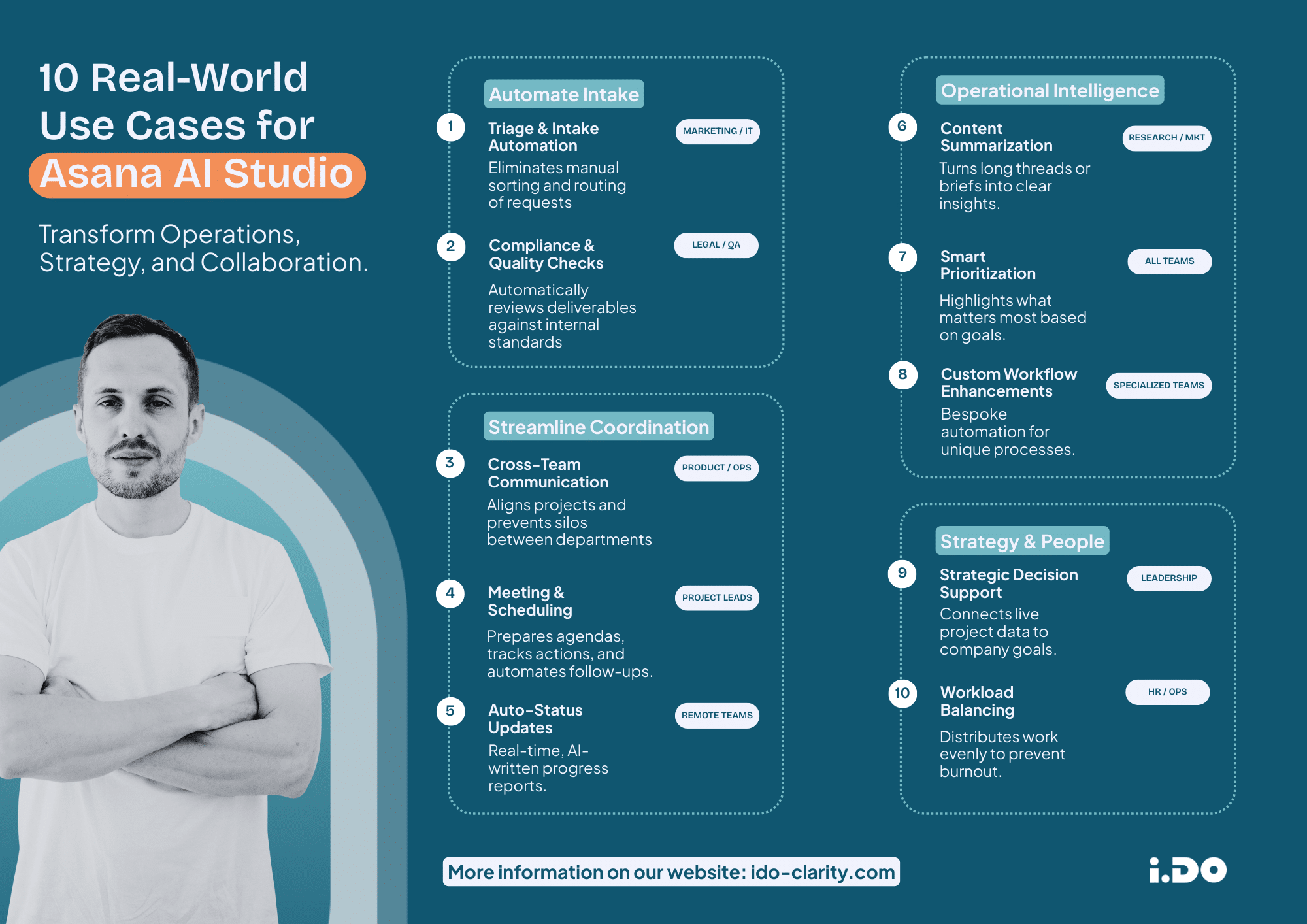
The impact of AI workflow automation is immediate. Here is how different departments can leverage it to boost operational efficiency:
#1 Marketing & Content: No More Manual Triage
Instead of spending hours sorting through incoming requests, AI Studio reviews new briefs. It compares them to past campaigns, checks for missing information and preps the work.
The result: Creative teams focus on creating, not administration.
#2 Support & Ops: Intelligent Routing
Agents analyze incoming tickets, assess urgency, and automatically assign them based on expertise and agent availability.
The result: Faster response times and fewer coordination meetings to figure out “who is doing what”.
#3 Leadership and Strategy: Alignment Made Easy
Leaders can build agents that monitor company goals and proactively flag projects drifting off course. This directly connects project data to organization’s global objectives.
Why Integrate Asana AI Studio Now?
Adopting Asana AI Studio isn’t about chasing the latest tech trend; it’s operational necessity. It eliminates manual triage, ensures balanced workload distribution to prevent burnout, and turns long threads into actionable summaries.
It adds a layer of intelligence directly to your workflows ensuring your teams stay focused on what actually moves the needle.
Ready to Build Your Own Agents?
At i.DO, we don’t just sell licenses; we guide you to transform the way you work. We have lived through the chaos, and we know how to help you find clarity.
If you want to see how Asana AI Studio applies specifically to your industry (Manufacturing, Media, or Professional Services…), watch our dedicated webinar or reach out to build a solid business case.