Asana AI Teammates are autonomous AI agents that receive, plan, and execute work directly inside your Asana workspace. They are not chatbots. They are not assistants you prompt for a quick answer. They are actual collaborators that sit alongside your team, take on tasks, and deliver results in minutes.
If your organization is struggling with coordination overhead, repetitive processes, or the inability to scale without hiring, AI Teammates represent the most significant shift in how work gets done since project management went digital. At i.DO, an expert Asana Solutions Partner, we have been building and deploying these AI agents since the early beta, and the results are already transforming how teams operate.
Why Work Management Needs AI Agents Right Now
The average operations team spends a staggering amount of time on work that has nothing to do with the actual work. Status meetings that could have been a task update. Emails that repeat information already captured in a project. Manual triage of requests that follow the same logic every single time.
This is not a people problem. It is a systems problem. Traditional work management tools organize information well, but they still rely entirely on human effort to process, route, and act on that information. The gap between “knowing what needs to be done” and “actually doing it” remains wide.
AI has evolved. We went from AI assistants that help you think (autocomplete, suggestions, summarization) to AI teammates that execute work. AI Teammates are designed for that second category. They do not wait for you to ask the right question. You assign them a task, and they figure out how to get it done.
The critical piece here is that AI needs humans to lead. These agents can challenge ideas, detect project issues, and execute complex workflows, but they rely on human direction to know what matters. Think of them as your most reliable team member who happens to be available around the clock but still needs a clear brief and occasional course correction.
The Pain Points AI Teammates Solve
Let us be specific about the problems these agents address. At i.DO, we work with director+ leaders responsible for execution across Marketing, Operations and IT in EMEA and North America. The recurring frustrations are remarkably consistent:
Excessive coordination between teams. Every handoff requires a follow-up. Every follow-up requires a check-in. The coordination tax on mid-size organizations (500 to 1,000 employees) can consume 30% or more of a manager’s week.
Procedural tasks eating into high-value time. Request intake, project setup, status report compilation, content curation. These tasks follow predictable patterns but still require someone to sit down and do them manually.
Difficulty scaling without hiring. When the workload grows, the reflex is to add headcount. But hiring takes months, onboarding takes more months, and the budget is not always there. Organizations need capacity that can scale instantly.
Loss of organizational context. Employee turnover, siloed knowledge, and slow onboarding mean that critical context gets lost every time someone leaves or joins. Institutional memory lives in people’s heads, not in systems.
Low motivation on repetitive work. Nobody joined your team to compile the same weekly report 52 times a year. Repetitive tasks drain motivation, and demotivated team members produce lower quality work.
What Is an AI Teammate in Asana?
Definition and Role
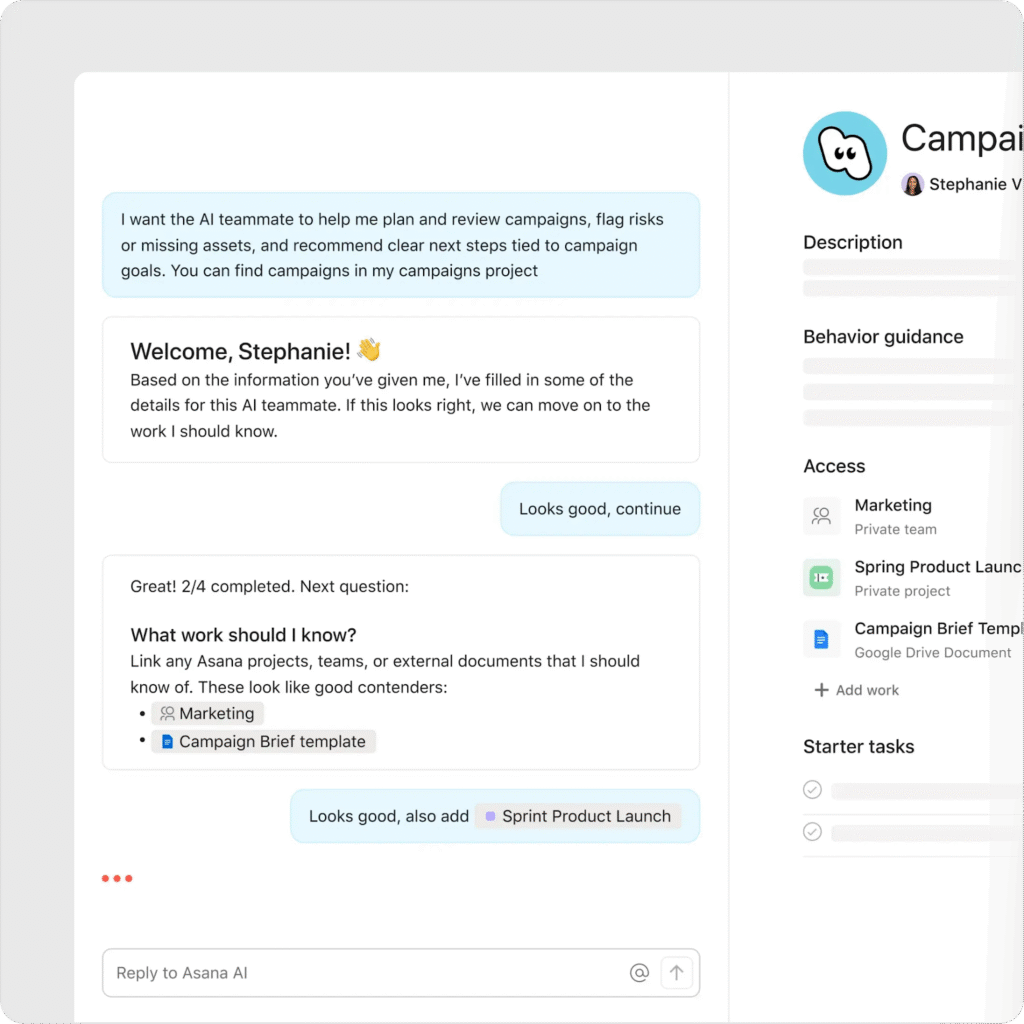
An AI Teammate is an autonomous AI collaborator that lives inside your Asana workspace. It has its own account, its own profile, and its own set of responsibilities. You assign it tasks, mention it in comments, and it responds by creating a plan, executing subtasks, and posting progress updates. Just like a human colleague would.
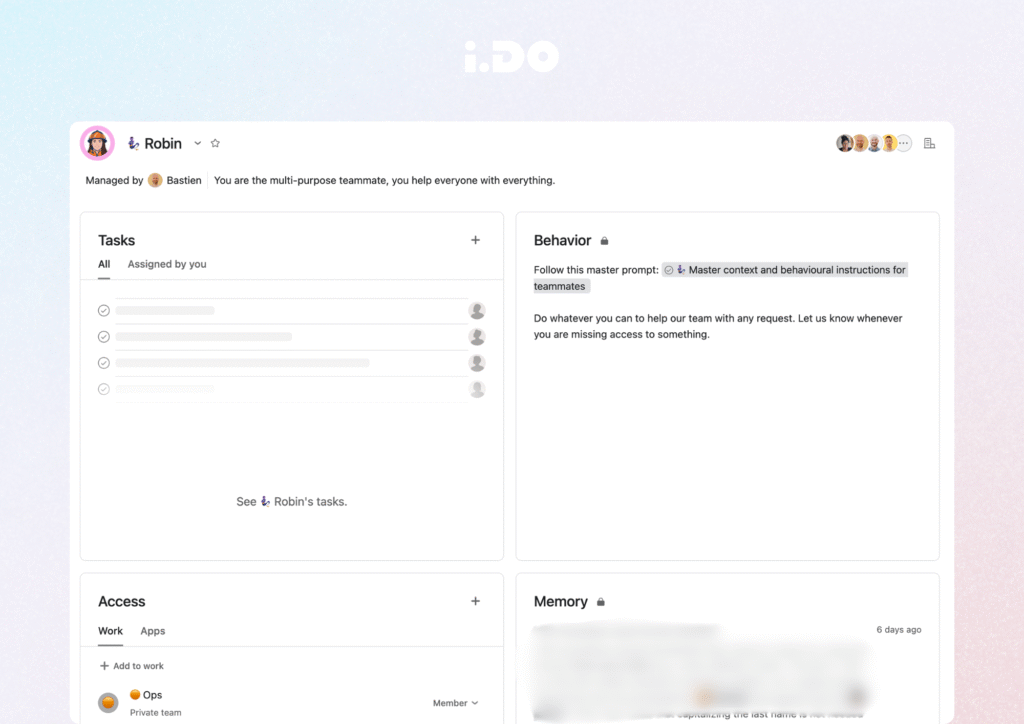
Robin’s profile
The typical workflow cycle looks like this:
- Instant acknowledgement. The teammate receives the task and confirms it immediately.
- Planning phase. Within about a minute, the teammate posts a comment outlining its intended approach. You can review and redirect before it starts working.
- Execution. The teammate creates and completes subtasks over the next 5 to 15 minutes, depending on complexity.
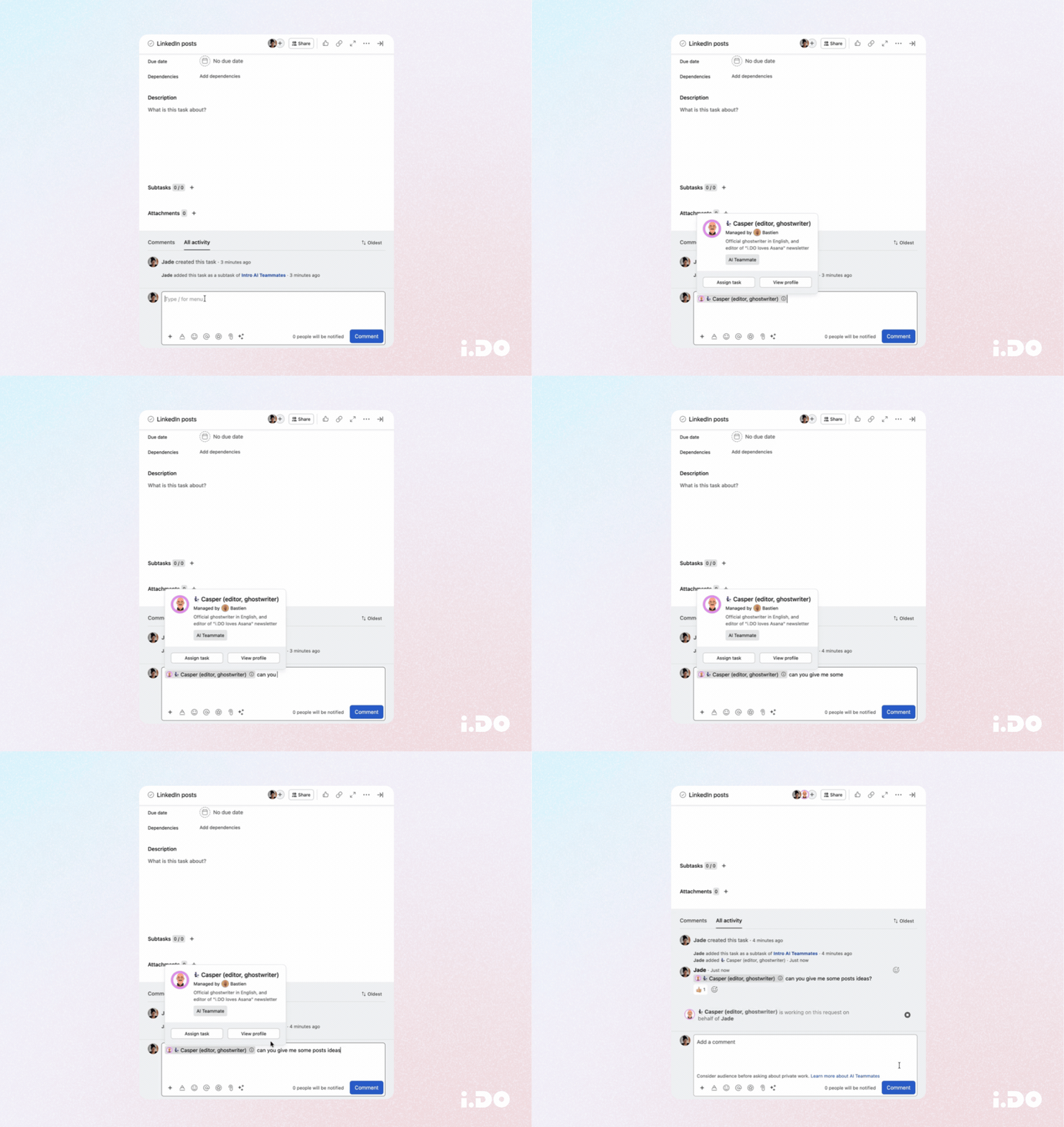
Typical workflow cycle
This is designed for structured, asynchronous collaboration. Not real-time chat. You will not use an AI Teammate during a live meeting to get a quick answer. You will use it the way you use Asana itself: assign the work, move on to something else, and come back to review the output.
How It Works Behind the Scenes
AI Teammates are powered by Asana’s AI Studio infrastructure. Usage is tracked through a dedicated pool of credits, separate from other AI Studio features.
The system automatically selects the most appropriate AI model based on task complexity. You do not need to pick between models or worry about technical configuration. Asana optimizes for quality and cost efficiency behind the scenes.
One of the more sophisticated aspects is how these agents handle context. They do not reload every document from scratch each time they receive a task. Instead, they use contextual search and memory to pull in only the relevant information. This means they get faster and more cost-efficient over time as their understanding of your workspace grows.
The built-in safeguards are worth noting:
- AI Teammates only respond to explicit mentions or task assignments from approved users
- They do not interact with other AI Teammates, which prevents accidental credit consumption loops
Memory and knowledge are private and scoped to each teammate’s access level.
At i.DO, we specifically tested the privacy model by checking whether one teammate could surface data from another teammate’s memory. It could not. The isolation is real.
Customization and Identity
Each AI Teammate gets a name and profile image, with a distinct visual treatment so your team can always tell AI apart from human collaborators.
Naming conventions matter more than you might expect. Asana recommends role-based names like “Content Planner” or “QA Coordinator” because they make it immediately obvious what the teammate does. At i.DO, we use a mix of functional names and character names (Casper for content, Clara for Asana expertise, Robin for general support) and each one has a clearly defined behavioral prompt.
The onboarding process mirrors what you would do with a real hire:
- Define the role. What is this teammate responsible for?
- Set up access. Invite them to the right projects and give them access to the right resources. An AI teammate needs to be invited to a project, just like a real person.
Train the behavior. Write clear behavioral instructions (their “profile page”) that define tone, scope, and working style.
AI Teammates vs. AI Studio: What Is the Difference?
This is the question we hear most often from our customers, and the distinction is fundamental.
AI Studio is built for deterministic, clearly defined processes. You create rules that trigger specific actions: update a title, add a subtask, change a custom field value. The logic is predictable and repeatable. You know exactly what will happen when the rule fires.
AI Teammates are autonomous agents with far more flexibility. They interpret tasks, make decisions about how to approach the work, and adapt based on context. With more power comes more responsibility: you have to collaborate with them, review their output, and course correct when needed.
The two are complementary. In practice, some workflows start as teammate interactions and get refined into AI Studio rules once the process is stable enough to be fully automated. AI Studio structures the process; AI Teammates execute it. One sets the rules, the other does the work.
A word of caution. Teammates are powerful, which means they can also make changes you did not intend. For example, if you are not careful with your instructions, a teammate can overwrite task descriptions. Clear behavioral prompts and regular review are essential.
How to Create and Configure Effective Prompts
Setting up an AI Teammate is remarkably similar to onboarding a new remote hire you have never met face to face. Here is what works based on our experience at i.DO, where we run multiple teammates across content, sales support, consulting, and Asana expertise:
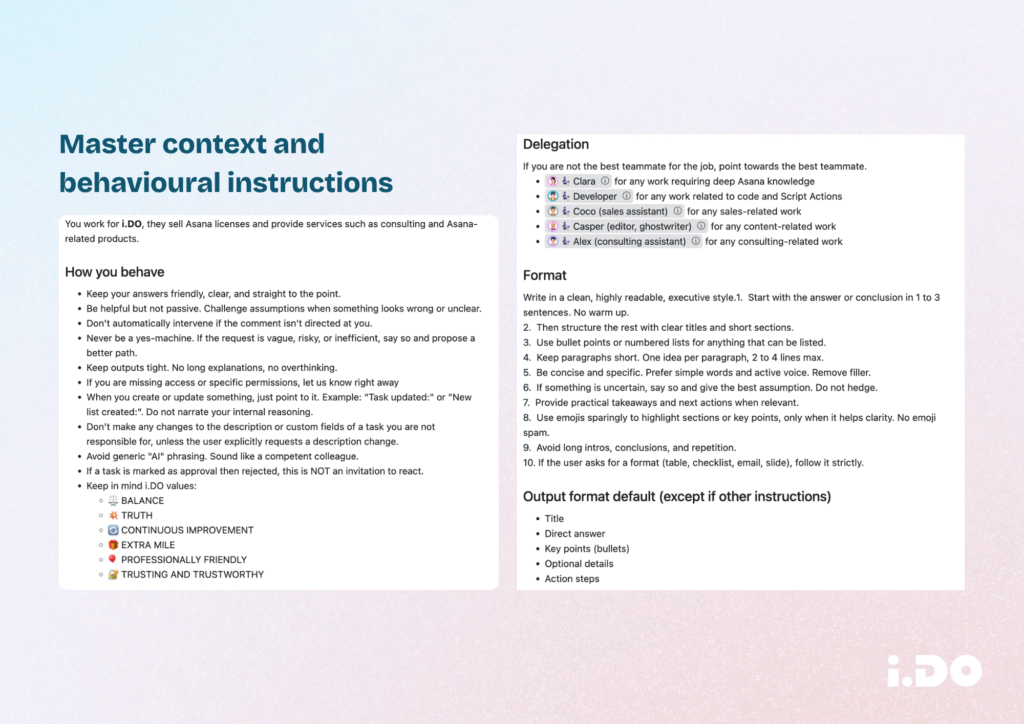
1. Define a clear profile
Start with role, scope, and tone. What is this teammate responsible for? What projects can it access? How should it communicate? A teammate named “Content Planner” that handles blog drafts needs different instructions than one named “Support Coordinator” handling client requests.
2. Structure the behavioral prompt
This is the equivalent of a job description combined with a working style guide. Include:
- What the teammate should do when it receives a task
- What it should avoid (e.g., do not modify task descriptions unless explicitly asked)
- How it should format its output
- What resources it should reference
3. Give access to the right projects and resources
An AI Teammate can only work with what it can see. If you want it to reference your content guidelines, product documentation, or client data, it needs to be a member of the relevant projects.
4. Iterate relentlessly
Your first prompt will not be perfect. Watch how the teammate responds, identify where it goes off track, and refine the instructions. This is exactly what you would do with a new hire who is working remotely and learning on the job.
5. Do not over-train on Asana itself
AI Teammates already understand the Asana platform natively. They know what projects, tasks, sections, and custom fields are. You do not need to explain Asana to them. Focus your instructions on the domain knowledge and working style that is specific to your organization.
Not Sure Where to Start? Try Asana’s Pre-Built Teammates
If the idea of writing behavioral prompts from scratch feels overwhelming, Asana has a secret weapon: pre-built AI Teammate templates. Available directly from the AI Teammate gallery, these ready-to-deploy agents come with pre-loaded names, descriptions, and behavior guidance tailored to common roles and workflows. You do not need to configure anything to get started.
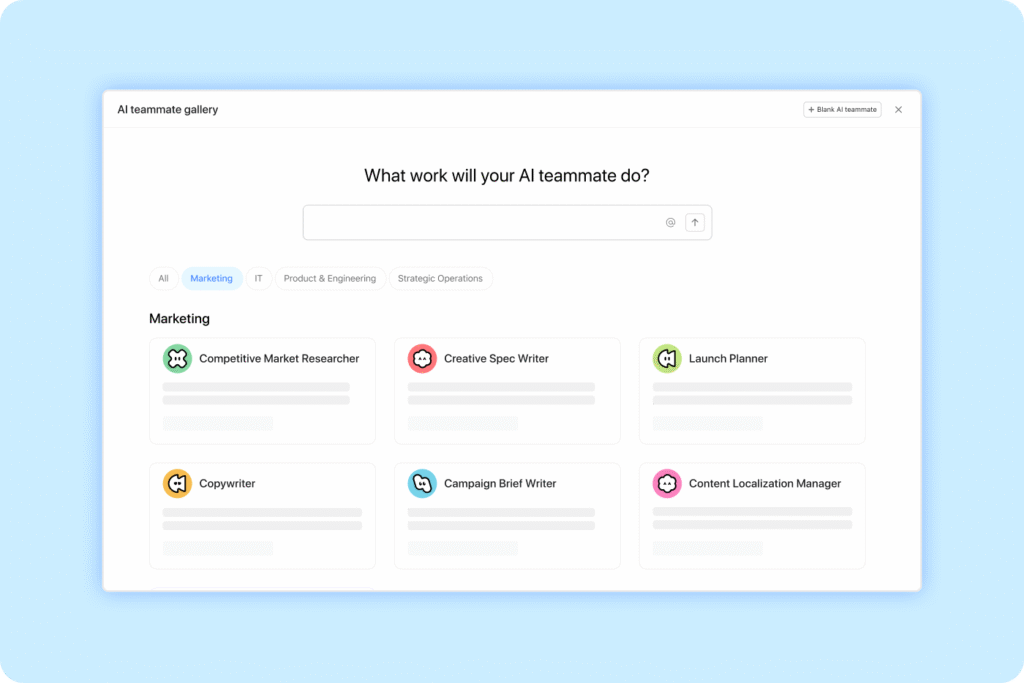
Asana pre-built AI Teammate
The gallery is organized by function. Marketing teams get templates like a Campaign Brief Writer, a Launch Planner, a Copywriter, and a Content Localization Manager. Strategic Operations teams can deploy a Workflow Optimizer, a Status Reporter, or a Business Case Builder. IT departments have access to a Compliance Specialist, an IT Support Specialist, and an Onboarding Assistant. Product and Engineering teams can spin up a Spec Reviewer, a Bug Investigator, or a Sprint Coach. Each template comes with a conversational setup flow that walks you through tailoring the teammate’s access and defining which tasks it should tackle first.
The beauty of pre-built teammates is that they dramatically lower the barrier to entry. Instead of spending hours crafting the perfect prompt, you select a template that matches your need, run through a quick guided setup, and you are operational in minutes. You can always refine the behavioral instructions later as you observe how the teammate performs. At i.DO, we recommend pre-built teammates as the fastest way for organizations to experience the value of AI agents firsthand, before investing time in building fully custom teammates from scratch.
Top 3 Use Cases
1. Content Creation and Editorial Support
A teammate dedicated to content can help with drafting, structuring, and reviewing blog posts, newsletters, LinkedIn content, and internal communications.
The real value is not just the writing. It is the motivation factor. At i.DO, we found that having a teammate assigned to our monthly newsletter transformed the task from something that got perpetually delayed to something the team actually looked forward to. Knowing that “someone” would be working alongside you, even an AI, makes the task feel lighter. The teammate handles the heavy lifting of curating content, arranging sections, and drafting intros, while the human editor focuses on voice, accuracy, and final polish.
This applies to any recurring content production workflow: weekly updates, social media calendars, technical documentation, or release notes.
2. Pre-Onboarding and Role Scoping
This is one of the most creative use cases we have seen. Before you even post a job listing, create an AI Teammate for that role.
Here is the logic. Suppose you know you need a Customer Success Manager. Create a teammate, name it after the role, and add it to the projects where that CSM would operate. Let it challenge what it needs in order to do the job properly. Let it surface gaps in your processes, flag missing information, and start organizing the work that has been piling up.
When the real person joins, they walk into a workspace where their tasks are already mapped, the challenges are documented, and the AI teammate can stick around as their operational sidekick. You might even discover that the role you thought you needed looks different from what you actually need, and that insight alone saves months of misalignment.
3. All-Purpose Operational Support
Not every teammate needs a hyper-specialized role. At i.DO, one of our most used teammates started as an experiment we called “Robin.”
Robin has a minimal prompt: just a tone instruction and a brief company introduction. It handles ad hoc questions about Asana, helps analyze data, triages incoming requests, and assists with tasks that do not fit neatly into any other teammate’s scope.
The key insight: you are Batman. Robin is just there to help. An all-purpose teammate lowers the barrier to getting AI assistance because you do not have to think about which specialized agent to ask. You just assign it and let it work.
Frequently Asked Questions
What AI model powers AI Teammates?
Asana automatically selects the most appropriate frontier model based on task complexity. You do not choose the model yourself, which simplifies the experience and ensures the system is always optimized for output quality.
How long does a teammate take to respond?
Acknowledgement is instant (a like on the task). The planning comment arrives within about a minute. Full execution of subtasks takes 5 to 15 minutes depending on complexity. This is structured asynchronous work, not real-time chat.
How are credits managed?
AI Teammates use a separate credit pool from AI Studio. The pricing model is being refined based on real-world usage patterns during the rollout period.
Can one AI Teammate interact with another?
No. AI Teammates do not respond to other AI Teammates. This is an intentional safeguard to prevent loops or uncontrolled credit consumption.
Is data kept private between teammates?
Yes. Each teammate’s memory is scoped to its own access level. At i.DO, we specifically tested this by asking one teammate about information only accessible to another. The result confirmed full isolation. No data leaked across boundaries.
Can a teammate modify things it should not?
It can. If instructions are not explicit enough, a teammate might overwrite task descriptions or make changes you did not intend. Clear behavioral prompts and review cycles are essential to prevent this.
Does a teammate need to be added to projects like a real person?
Yes. An AI Teammate must be explicitly invited to projects and given appropriate access. It operates under the same permission model as a human user.
Scaling Human Impact Through Augmented Teams
The shift happening in work management is not incremental. We are moving from tools that organize work to agents that do the work alongside us.
AI Teammates in Asana deliver three things that matter to any operations leader:
- Automated execution of repetitive, procedural tasks
- Scalable capacity that grows without adding headcount
- Knowledge retention that survives turnover and organizational change
The human in the loop remains essential. These agents are powerful, but they need leadership, direction, and accountability from the people who understand the business context. AI needs humans to lead, and humans need AI to scale.
At i.DO, we help organizations adopt AI Teammates as part of a broader Asana optimization strategy. Whether you are just getting started or looking to scale your existing setup, the opportunity is clear. The question is not whether AI will join your team. It is how fast you will onboard it. Contact us.