


If your team runs events, you already know the pattern: the same tasks come back every time, but the work still starts from scratch. Deadlines move, updates live in too many places, and cross-functional coordination becomes harder with every new event.
This is exactly where Asana helps. Instead of managing event planning through scattered spreadsheets, email threads, and manual follow-up, you can build repeatable workflows, assign clear ownership, and monitor progress across every event in one place.
At i.DO, an Asana Solutions Partner, we help event teams turn recurring event chaos into structured execution. The goal is simple: less manual coordination, better collaboration, and smoother event launches.
Why event teams struggle without the right system
Most event operations challenges come back to three issues.
1. Too much manual and repetitive work
Many events follow the same structure. The phases are similar. The tasks are similar. The deadlines are similar. But without a repeatable workflow, teams recreate the same project plan every single time.
That wastes time and increases the risk of missing key steps.
2. Limited visibility across one event or many
It is already difficult to track one event when updates are spread across different tools. It becomes much harder when several events are running at the same time and no one has a clear global view.
Managers need to see which events are on track, which milestones are slipping, and where the pressure is building.
3. Cross-functional collaboration becomes messy fast
Events rarely belong to one team. Marketing, operations, content, design, leadership, and external stakeholders often all contribute to the same launch.
If the tool does not support cross-functional work, the process quickly turns into fragmented communication and unclear accountability.
How Asana helps event teams move from planning to execution
Asana gives event teams a single source of truth for the work behind every event.
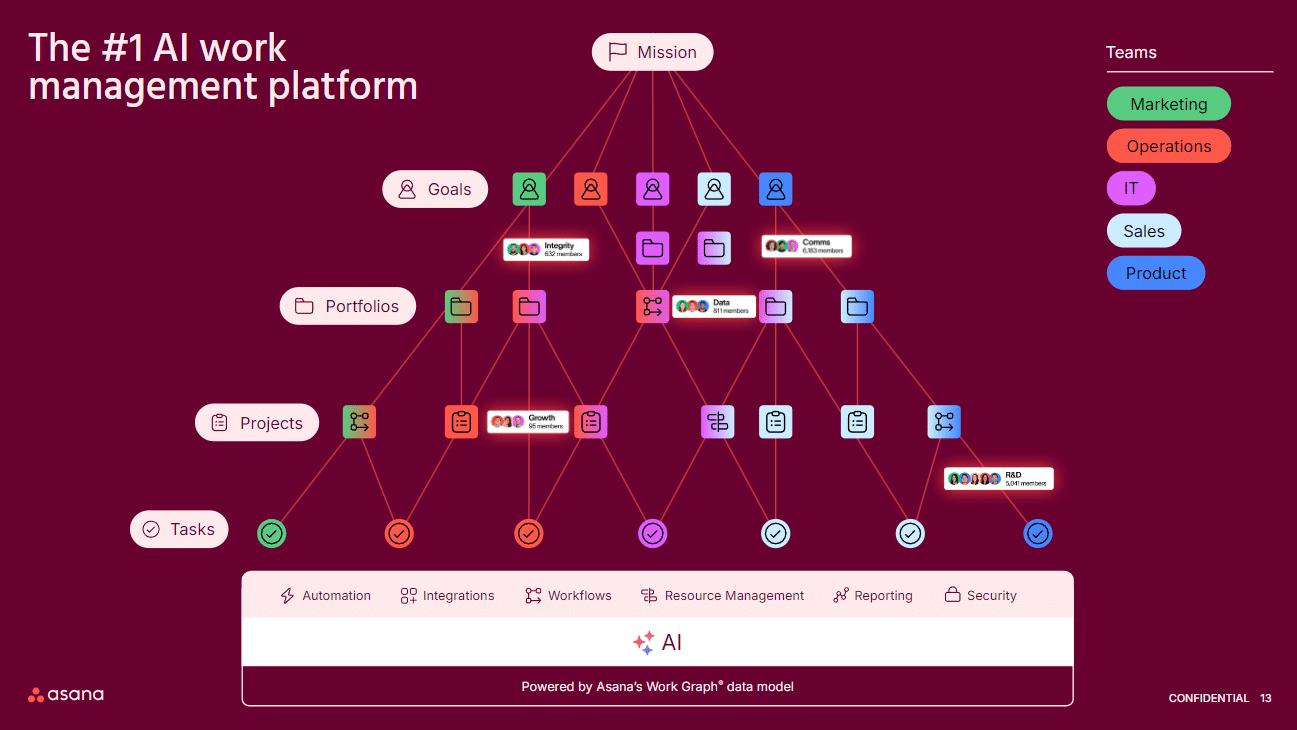
Instead of treating event planning as a collection of disconnected tasks, you can structure it across multiple levels:
- Tasks for the concrete actions that need to happen
- Projects for each individual event
- Portfolios for tracking multiple events at once
- Goals for connecting operational work to broader business priorities
This structure improves visibility at both the operational and managerial level.
Start with tasks and projects for day-to-day execution
For most event teams, the operational foundation starts with one Asana project per event.
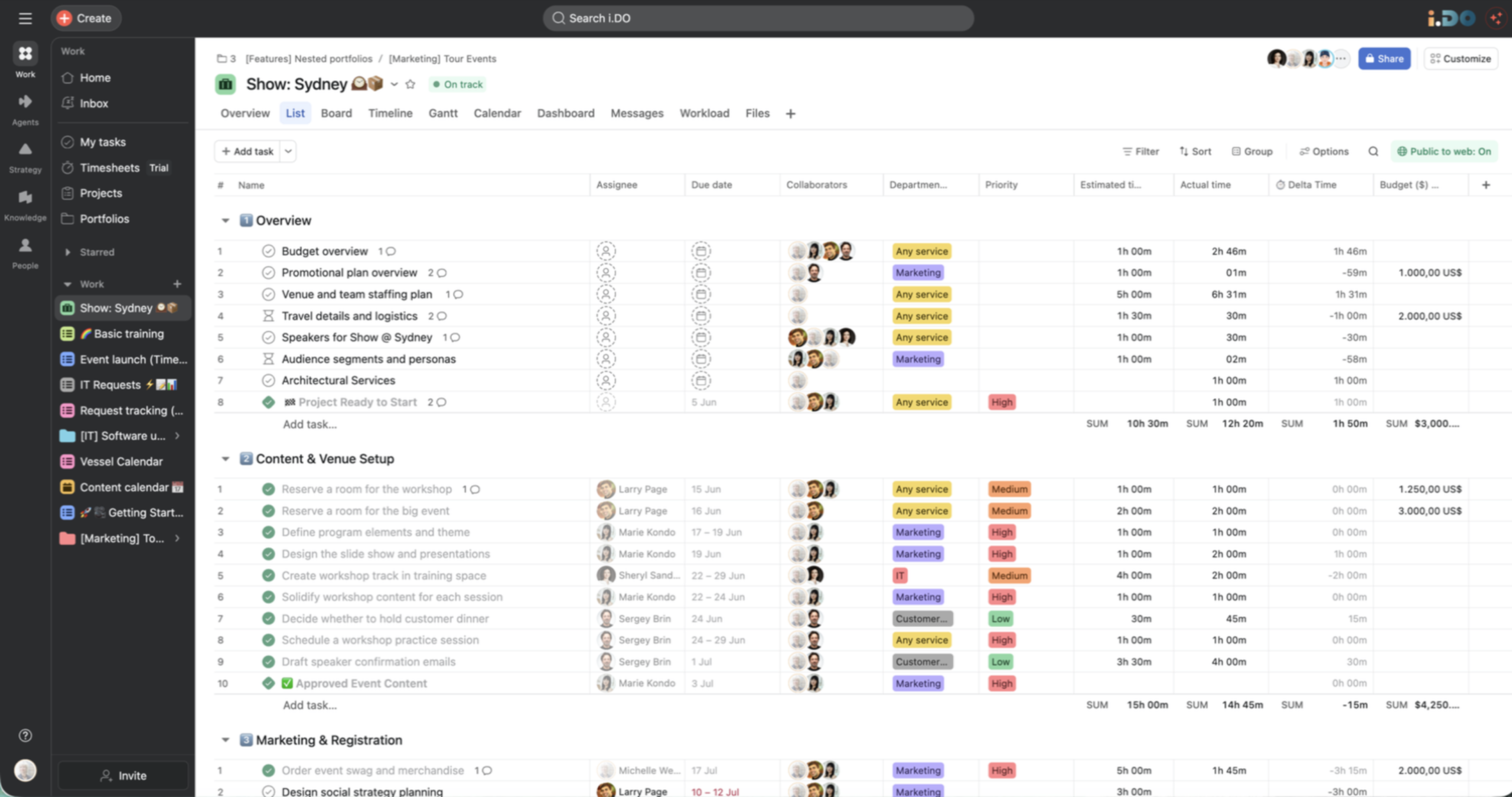
Inside each project, you can:
- assign tasks to specific owners
- set due dates and priorities
- use milestones to mark critical deadlines or major phases
- add custom fields to track important event information
- attach files and context directly where the work happens
- create subtasks for more detailed coordination
- keep team conversations connected to the relevant work
This matters because event execution is not just about documenting the plan. It is about turning that plan into daily action with clear accountability.
Use timeline and Gantt-style views to visualize the launch
A strong event plan needs more than a task list.
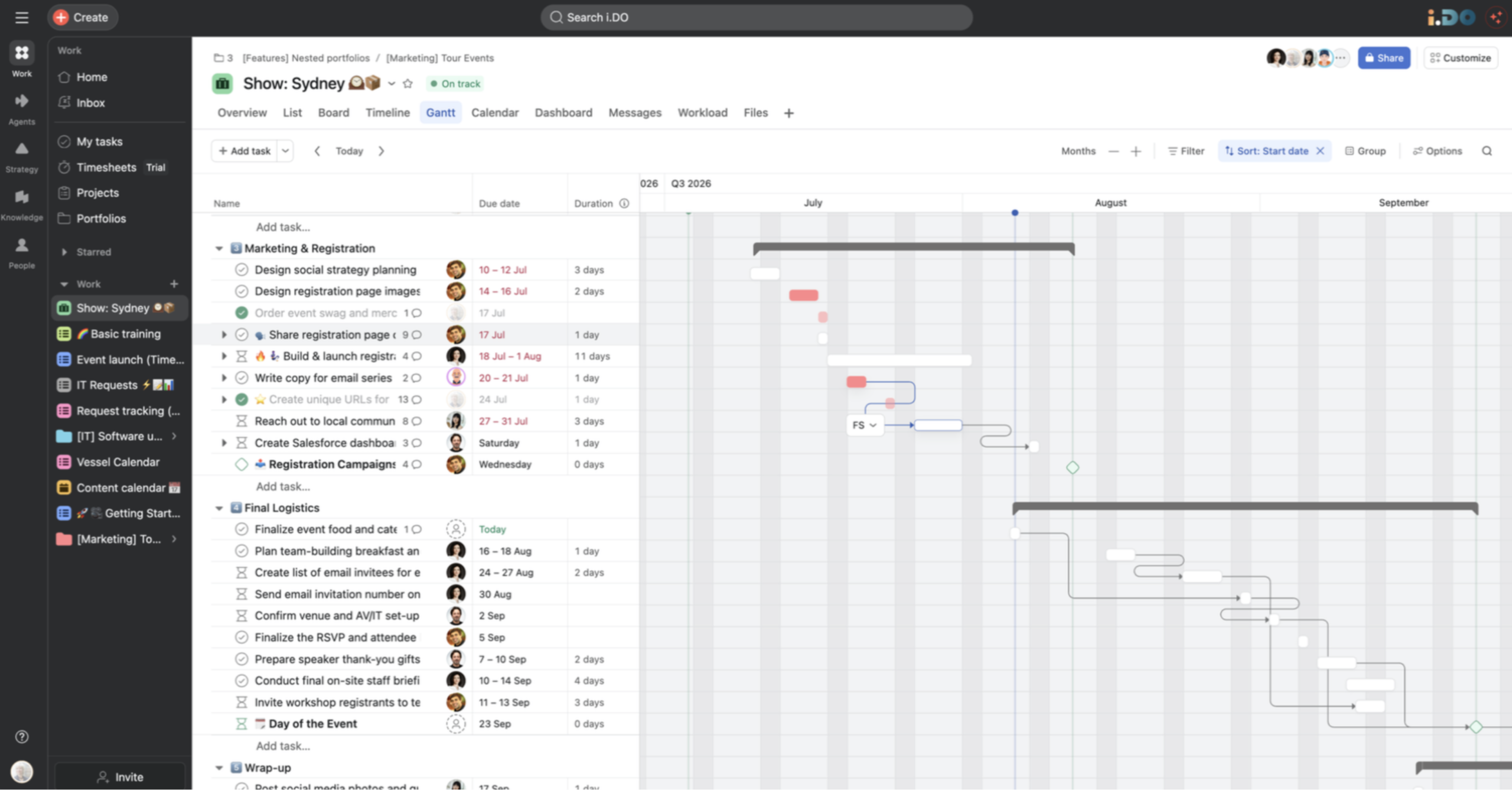
In Asana, event teams can use timeline and Gantt-style views to understand how work fits together over time. These views help teams:
- visualize the full event schedule
- identify dependencies between tasks
- see how delays affect the rest of the launch
- adjust due dates with better context
- manage critical handoffs between teams
For event managers, this creates a clearer picture of how the project is progressing before issues become urgent.
Standardize recurring events with project templates
When your team runs similar events across different cities, markets, or business units, repeatability becomes a huge advantage.
With project templates in Asana, you can create the same event structure in just a few clicks. That includes:
- recurring phases
- prebuilt task lists
- assigned responsibilities
- due date structures
- milestone checkpoints
- predefined custom fields
Instead of rebuilding each event from zero, your team starts from a consistent framework and adapts only what needs to change.
This reduces setup time and improves execution quality across every launch.
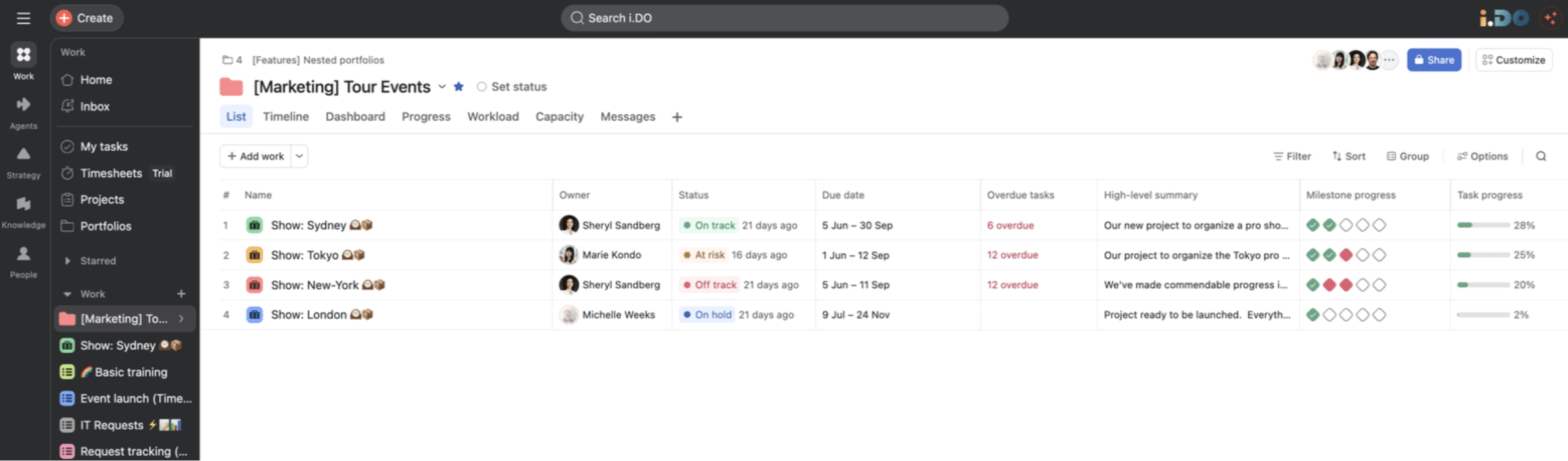
Track multiple events with portfolios
Once several event projects are active, visibility at the portfolio level becomes essential.
In Asana, a portfolio lets you compare multiple events in progress at the same time. You can quickly see:
- who is responsible for each event
- current status across launches
- upcoming due dates
- overdue tasks
- milestone progress
- overall task progress
This gives managers and team leads a reliable overview without having to open every project one by one.
Use dashboards to spot risk before it slows the team down
Dashboards help event teams turn project activity into fast, readable insights.
With the right dashboard setup, you can monitor:
- blocked or overdue work
- workload pressure across team members
- important milestones coming up
- bottlenecks across multiple launches
- operational KPIs that matter to your event process
That makes it easier to act early, rebalance work, and keep launches moving.
What event teams gain from using Asana
When event workflows are structured correctly in Asana, teams gain more than organization.
They gain:
- better visibility into project progress
- stronger collaboration across teams
- faster and more consistent event launches
- less manual project setup
- clearer ownership and accountability
- more confidence at the managerial level
This is why Asana works so well for event teams. It supports both the detailed execution work and the higher-level coordination required to run several events successfully.
FAQ: Asana for event management teams
Can Asana be used for recurring events?
Yes. Asana is well suited for recurring events because teams can use project templates to standardize repeatable workflows, tasks, milestones, and custom fields.
How does Asana help event managers track multiple events?
Asana portfolios provide a central view across active event projects. Managers can compare statuses, due dates, progress, overdue tasks, and milestones in one place.
Is Asana useful for cross-functional event teams?
Yes. Asana works well for cross-functional collaboration because tasks, deadlines, files, updates, and conversations stay connected in one shared workflow.
What Asana views are most useful for event planning?
List view is useful for day-to-day task management, while timeline and Gantt-style views help teams visualize schedules, dependencies, and launch sequencing.
Final thoughts
If your event team is still rebuilding the same plans, chasing updates manually, and struggling to see how launches are progressing, the problem is rarely effort. The problem is the system.
Asana gives event teams the structure to standardize planning, improve collaboration, and move from reactive coordination to controlled execution.
At i.DO, we help teams design the right Asana workflows for the way they actually run events. If you want to see what this could look like for your team, book a free personalized demo and we will show you how to turn event planning into a more scalable, visible, and repeatable process.