

If your weekly 1:1s keep slipping into repetitive catch-ups, an AI teammate for meeting prep in Asana gives you a practical fix. It reviews past meeting notes, pulls forward open topics, and prepares a focused agenda directly inside each upcoming meeting task. In my own workflow at i.DO, this setup saves about 1 hour every week while improving meeting quality.
Why meeting prep breaks down so easily
Most managers do not struggle with running meetings. They struggle with preparing them consistently.
Before each 1:1, you usually need to check the last conversation, identify unresolved topics, review action items, and remember patterns that have come up more than once. That work is not hard, but it is repetitive. When the week gets busy, it is often the first thing that gets skipped.
The result is predictable:
- Meetings start without a clear agenda
- The same topics come back again and again
- Follow-ups get lost between weeks
- Important signals stay buried in old notes
This is exactly where Asana becomes more than a task tracker. With the right structure, it becomes the working memory for your recurring meetings.
What an AI teammate does for meeting prep
An AI teammate in Asana can scan your upcoming meetings for the week, review previous meeting notes, and write a structured prep directly into each relevant task description.
Instead of summarizing everything, it extracts the most useful context for the next conversation.
For each meeting, the prep can include:
- Key topics to discuss based on previous notes
- Open follow-up questions that still need an answer
- Recurring themes that have appeared across several meetings
- Suggested decisions or next steps to close the loop
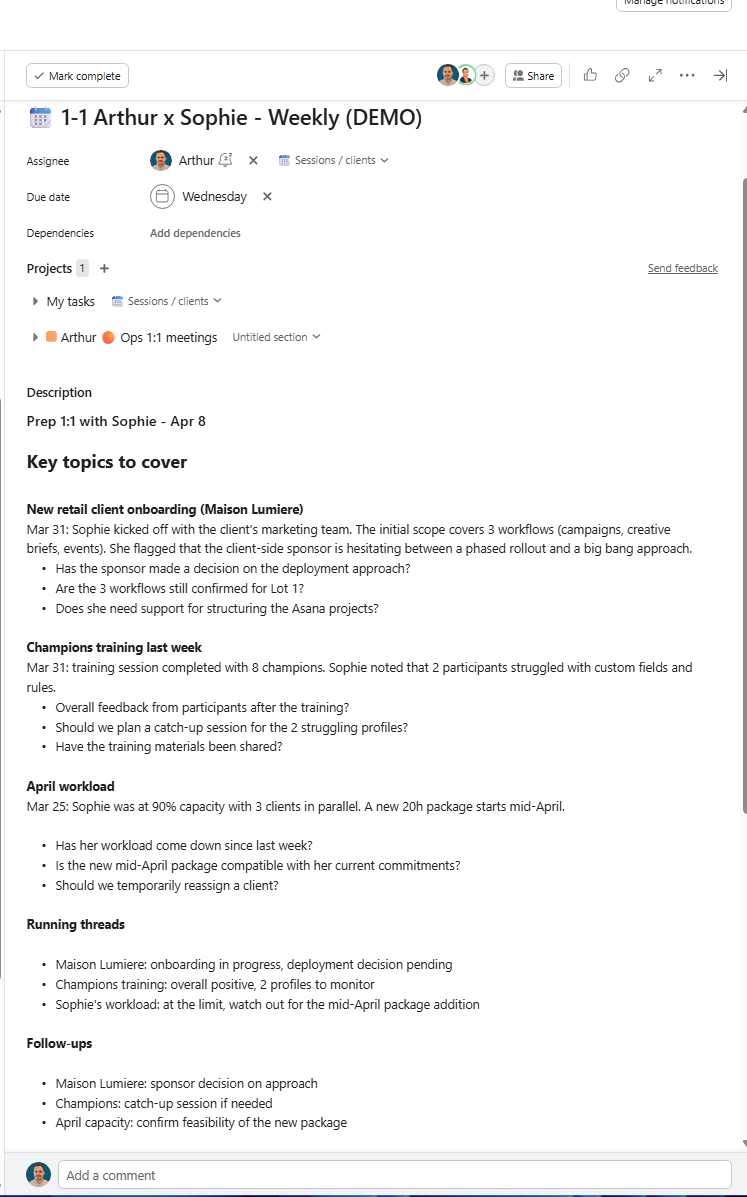
This gives you a ready-to-use agenda rooted in actual context, not memory.
How to set up an AI teammate for weekly meeting prep in Asana
1. Create one dedicated project for meetings
Start with a single Asana project that will hold the full history of your recurring meetings.
This part matters. An AI teammate performs better when the context is clean and consolidated. If your 1:1s are spread across different projects, meeting notes become fragmented. The agent cannot reliably understand the thread of each relationship.
If you already track meetings elsewhere, use multi-homing to add those tasks into the dedicated meeting project as well.
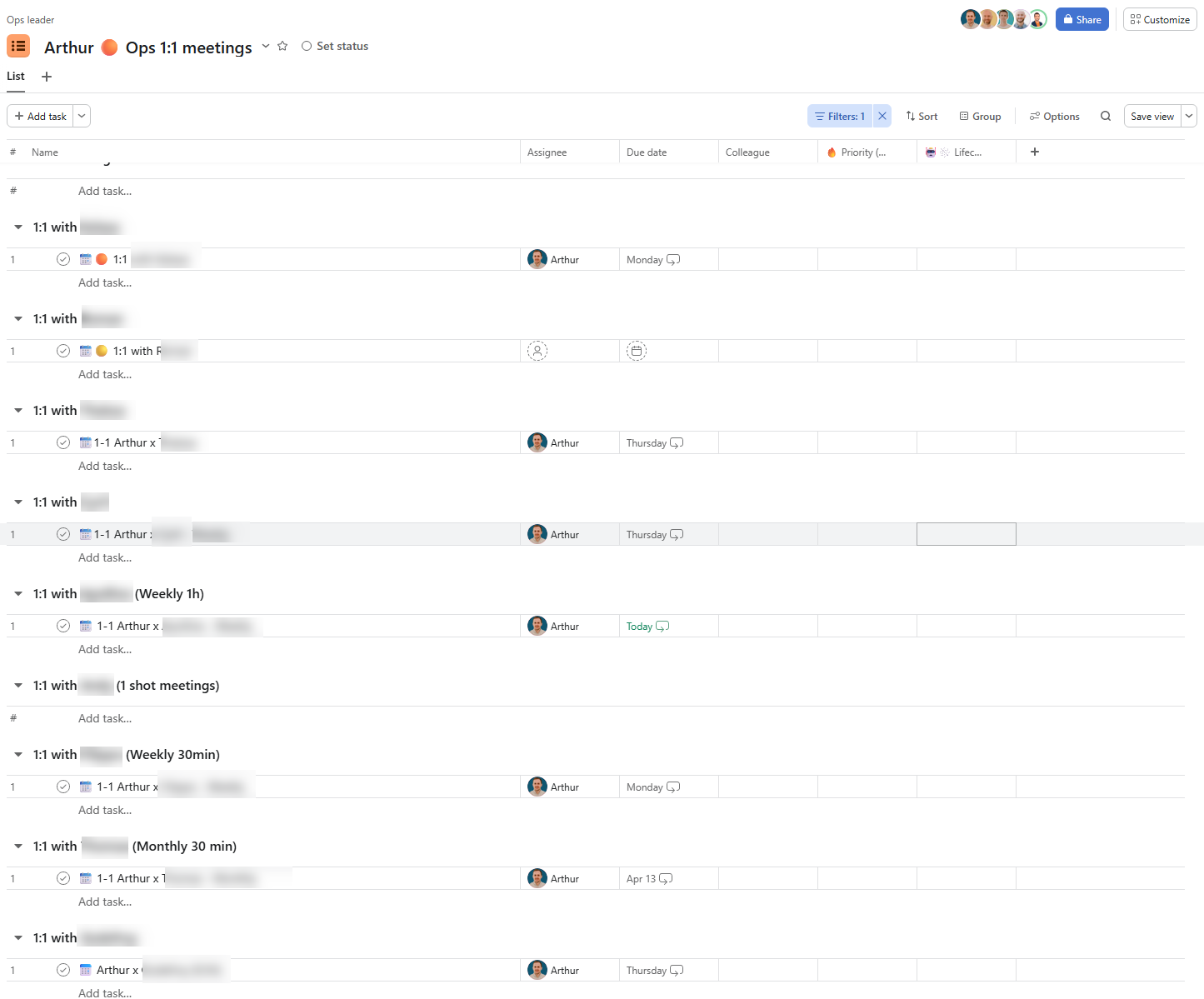
A strong structure is:
- One project for recurring meetings
- One task per meeting
- One section per colleague or direct report
That makes it easier for the AI teammate to follow each person’s history over time.
2. Add the AI teammate as a project member
The AI teammate needs access to the project to read task descriptions, comments, subtasks, and meeting history.
Add it as a project member with edit rights. Without this step, it cannot see enough context to prepare useful outputs.
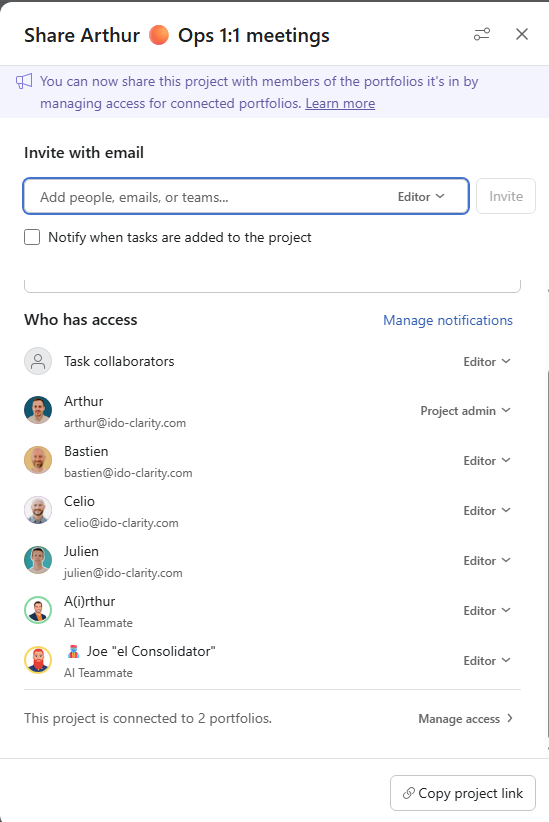
This is a critical setup rule for any Asana AI workflow. If the AI does not have access to the working context, the automation fails before it starts.
3. Create a recurring prep task with a clear prompt
At the bottom of the project, create a task such as Prep my meetings of the week and assign it to your AI teammate.
Then add a clear instruction in the description or in a comment. For example:
Every Monday morning, identify which meetings are happening this week in this project. For each one, review the previous meeting notes and extract the most actionable topics. Write a structured meeting prep in each upcoming meeting task’s description.
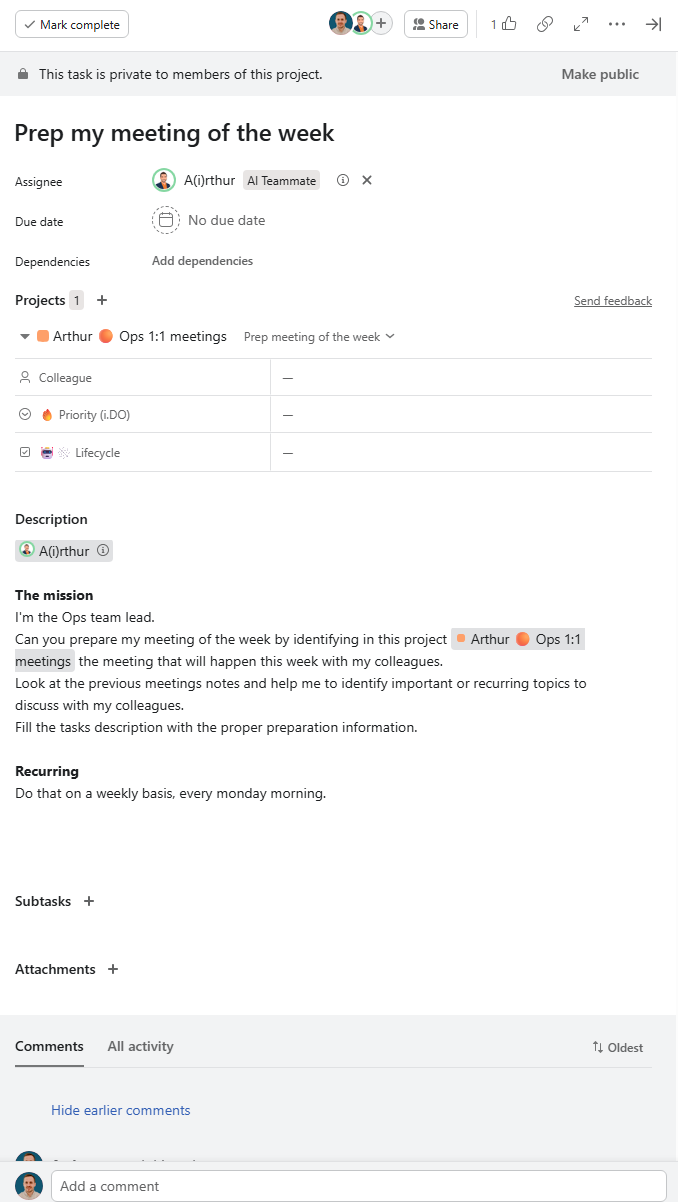
The quality of the output depends heavily on the prompt.
A vague instruction like “summarize everything” produces noisy results. A specific instruction like “extract only the most recent and actionable topics” produces a prep document you can actually use.
What good meeting prep looks like in practice
When this workflow is set up properly, each meeting task contains a compact brief before the conversation even starts.
That brief should help you answer four questions fast:
- What matters most to discuss this week?
- What was left unresolved last time?
- Which themes keep coming back?
- What decisions or follow-ups should happen next?
This is what turns meeting prep from a manual habit into a repeatable workflow.
Why this workflow works so well for managers
The value is not just time savings.
It also improves consistency. When your meeting preparation is automated inside Asana, your 1:1s become easier to run with discipline. You stop relying on scattered notes, memory, or rushed prep five minutes before the call.
This is especially useful for:
- Team leads managing several direct reports
- Operations managers running recurring alignment meetings
- PMOs coordinating follow-ups across multiple stakeholders
- Executives who want better continuity in weekly check-ins
From my work at i.DO, I see this as one of the clearest examples of practical AI at work. The best workflows do not replace judgment. They remove repetitive preparation so leaders can focus on the actual conversation.
Bonus: connect meeting notes to the next prep automatically
You can push this workflow further by connecting your meeting notes back into Asana automatically after each conversation.
For example, if transcripts, summaries, or structured notes are added to the meeting task after it happens, the AI teammate can reuse that material the following week.
This creates a compounding system:
- The meeting happens
- Notes are captured in the task
- The AI teammate uses those notes for the next prep
- The quality of the prep improves over time
That is how you build a reliable meeting workflow instead of repeating the same admin work every Monday.
What we learned from this setup
Three practical lessons stand out.
Keep the project focused. One project with one purpose gives the AI cleaner context and better output.
Write narrow prompts. Asking for recent, actionable topics works better than broad summaries.
Let the system improve over time. The more meeting history lives in Asana, the more useful the prep becomes.
FAQ
Can this work for group meetings too?
Yes, but it works best for 1:1s. Group meetings usually involve more moving parts and mixed context, so the prompt needs to be more explicit about participants, open decisions, and action items.
Does the AI teammate need calendar access?
No. This workflow can run entirely inside Asana. As long as meeting tasks have clear dates in the project, the AI teammate can identify which ones are happening that week.
What if my meeting notes are inconsistent?
The workflow still works. Better notes produce better prep, but even rough notes are enough to surface useful follow-ups and recurring topics.
Is this only useful for managers?
No. Anyone running recurring stakeholder meetings can use it. Managers are simply the clearest use case because they often repeat the same prep process several times every week.
Final takeaway
If you already run recurring meetings in Asana, this is one of the fastest AI workflows to put in place. It is simple, concrete, and immediately useful.
You are not automating the conversation itself. You are automating the repetitive prep that gets in the way of a better conversation.
As an Asana Solutions Partner, i.DO helps teams turn these kinds of workflows into practical operating habits that save time and improve execution.