
How to Staff Hundreds of Projects Automatically with Asana AI Studio

Project Staffing with Asana AI Studio

Quick Answer:

You can completely automate project staffing in Asana by combining Asana AI Studio with Script Actions. First, capture incoming requests via Asana Form. Next, use an AI Studio agent to analyze the request and assign available team members based on their current workload. Finally, trigger a Script Action to generate a new project from a template and instantly assign the AI-selected team members to their specific tasks.


How does Manual Staffing Impact Operational Efficiency?

Resource allocation consumes an average of 20 minutes per new request. Project Management Offices (PMOs) and operations managers waste valuable hours cross-referencing schedules, analyzing skills, and manually assigning tasks. At scale, this administrative bottleneck paralyzes efficiency. Delivery delays increase, and managers spend their energy on basic coordination instead of driving strategic initiatives.


How to automate project staffing using Asana AI Studio?

At i.DO, we developed a highly efficient workflow to eliminate manual resource allocation. This method relies on Asana AI Studio for smart decision-making and Script Actions for technical execution.

Follow these exact steps to deploy this intelligent automation:


Step 1: Configure the Intake Project

Your work management platform requires structured input data to make accurate decisions.

  1. Create a dedicated “Incoming Requests” project.
  2. Set up a detailed Asana Form to capture the exact project requirements.
  3. Add specific custom fields for every required role (e.g., Lead Consultant, Creative Director).
  4. Make the Due Date mandatory on the submission form.
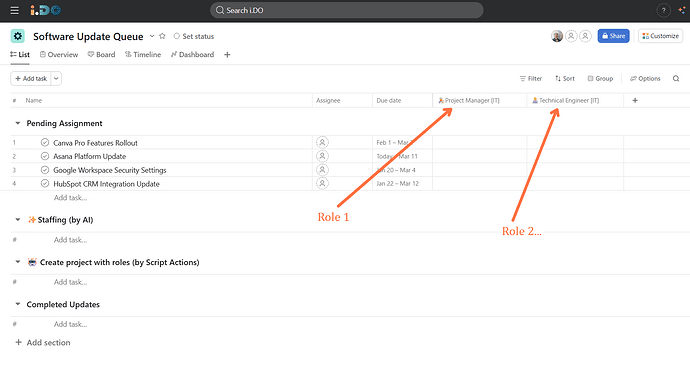
 

Configure the Intake Project


Step 2: Deploy the Decision-making Agent with Asana AI Studio

Hand over the assignment logic to Asana’s artificial intelligence to maximize your AI-powered productivity.

  1. Navigate to the Rules tab of your intake project and select AI Studio.
  2. Define the trigger as “New task added to the project”.
  3. Instruct the agent to analyze the task description, identify the necessary skills, and review the Workload tab to prevent team burnout.
  4. Set the AI to automatically populate the custom fields (created in Step 1) with available, competent team members.


Step 3: Execute Project creation with Script Actions

📌 Important note: Please note that Script Actions are available exclusively on Asana Enterprise plans.

Using Script Actions is crucial. Relying entirely on complex AI rules can quickly burn through millions of AI credits. Script Actions office a precise, cost-effective way to handle the actual project generation.

  1. Create a new rule triggered by the update of your role custom fields.
  2. Add a “Run a script” action.
  3. Connect this script to your master Project Template.
  4. The script generates the new project, retrieves the team members identified by the AI, and assigns them instantly to the correct tasks.
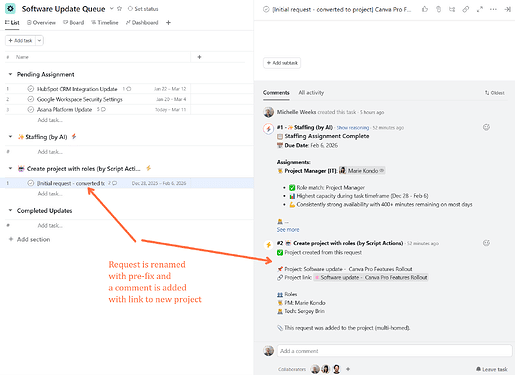
 

Project creation with Script Actions
 

For the requester, it feels like magic: they submit a structured request and, shortly after, see a comment with a link to a staffed project created for them.


Get the Exact Prompts and Code

Take immediate action. Download our exclusive implementation kit to replicate this workflow in under 15 minutes.

⚠️ Prerequisite: Please note that Script Actions are available exclusively on Enterprise plans.

Inside your free kit:

  • The exact prompt to copy-paste into Asana AI Studio for perfect Workload analysis
  • The complete JavaScript code for the Script Action to generate the project. 
  • Our Asana best practices to avoid configuration mistakes.


Fill out this form to receive the AI & Scripts Implementation Kit by email.


Which industries benefit the most from automated staffing?

This level of Asana automation transforms operations across highly demanding environments:

  • Professional Services & Consulting: Consulting firms instantly staff new client projects with available experts holding the right industry knowledge.
  • Manufacturing & Industrial: Factories deploy maintenance procedures seamlessly, automatically assigning qualified technicians based on live rotation schedules.


Media, Sports & Entertainment: Creative agencies manage massive peaks in campaign requests by intelligently distributing the workload among designers and copywriters.


What are the measurable benefits for your team?

Teams implementing this workflow immediately reduce meetings and free their managers from tedious data entry. You gain highly reliable project visibility tools featuring dashboards fueled by live, accurate data. Having guided hundreds of clients through complex digital transformations at i.DO, we consistently observe a drastic drop in delivery delays using these methods.

We bring proven strategies to help you find clarity. As an Asana Platinum Solution Partner, our role is to guide you step by step in building the customized method that truly transforms your daily operations.


Ready to automate reporting staffing with Asana and scale your workflows? 

You may also like

All PostsAsana EssentialsAsana Tips & TricksAsana Ebooks by i.DOAsana ChampionsAsana AI
Asana for operations

Why Every Operations Leader and COO Needs Asana to Accelerate Delivery

As a COO or operations leader, your...

Read More
Asana AI integrations

[2026] The Guide to Asana AI Integrations

Welcome to the future of project management!...

Read More
Project Staffing with Asana AI Studio

How to Staff Hundreds of Projects Automatically with Asana AI Studio

Quick Answer:You can completely automate project staffing...

Read More
Asana for HR

From Onboarding to Office Ops: Why Every HR Team Needs Asana

Most HR teams are still running critical...

Read More
Asana for PMO

Why Every PMO Should Use Asana to Drive Smart Collaboration

If your Friday afternoons still disappear into...

Read More
Asana ChatGPT integration

Asana x ChatGPT app, The Guide (2026)

At i.DO, we are big fans of...

Read More