
AI is only useful when it’s operational. Learn how to identify, build, and deploy AI-powered workflows that actually save time and create value.
The gap between AI hype and AI reality
Everyone’s talking about AI. Fewer are actually using it.
Most organizations have activated a few AI features here and there. A smart summary in their email client. An AI assistant that suggests replies. Maybe a chatbot that handles basic questions. These tools exist. They’re switched on. And yet, nothing has fundamentally changed.
The problem isn’t the technology. It’s the approach.
In our previous article, Are You Mature Enough to Start Using AI?, we explored the foundational questions every organization should answer before diving in. If you haven’t read it yet, start here. It sets the stage for everything that follows.
Now, let’s move from diagnosis to action. You’ve assessed your readiness. You’ve identified the potential. Here’s how to actually make AI work for your organization.
Why most AI implementations fail to deliver
Before we talk about how to succeed, let’s be honest about why most attempts fall flat.
AI features get activated, tested once or twice, and then quietly abandoned. Teams return to their old habits. The promised productivity gains never materialize. Leadership loses patience. The initiative fades.
This pattern repeats across industries, and it’s rarely a technology problem. The real blockers are organizational:
No clear ownership. AI features exist inside tools, but no one is responsible for turning them into functional workflows. They sit there unused, because using them requires intentional design.
No executive sponsorship. Without visible support from leadership, AI initiatives compete with every other priority. They lose.
No process clarity. You can’t automate what you don’t understand. Teams often lack a clear picture of their own workflows, making it impossible to identify where AI could help.
No measurable goals. When success isn’t defined upfront, there’s no way to know if the implementation worked. And without proof of value, there’s no momentum to continue.
Understanding these failure modes is the first step toward avoiding them.
Two types of AI features (and why it matters)
Not all AI is created equal. When evaluating AI capabilities in your tools, you’ll encounter two fundamentally different categories.
1. Smart Assistants
These are the most common. Think of them as digital assistants embedded in your existing tools: smart summaries, automatic note-takers, email rewrites, suggested replies, document enhancements.
They live inside your email client, your CRM, your project management platform.
They offer on-the-fly convenience. A meeting transcript summarized in seconds.
A draft email polished with one click. A document reformatted automatically.
These features reduce friction. They surface useful insights. But they rarely change how work actually flows. You’re still doing the same work, slightly faster.
Operational AI is helpful. It’s not transformational.
2. Automation AI
This is where AI moves from assistant to operator.
Instead of supporting your workflow, automation AI runs it. These are intelligent agents that act on your behalf across tools. They can:
- Triage inbound requests and create structured tasks
- Route work based on rules and context
- Trigger follow-ups automatically
- Generate entire projects from a briefing or form submissions
In platforms like Asana’s AI Studio, these capabilities take the form of intake agents, classification agents, action agents. Each targets a distinct pain point. Each automates work itself, not just one step of it.
This is where the real time savings emerge. This is where AI becomes a system-level asset rather than a feature checkbox.
The distinction matters because it shapes your implementation strategy. Operational AI requires adoption. Automation AI requires design.
Where AI delivers the most value
AI thrives on volume, repetition, and rules. The best candidates for automation share common characteristics.
Intake processes are prime territory. Emails, tickets, forms, requests: anywhere work enters your system through unstructured channels. AI can read, classify, and route these inputs faster and more consistently than humans.
Manual triage and classification waste significant time. Every hour spent deciding where a request should go is an hour not spent actually addressing it. AI handles this in seconds.
High-volume, rule-based responses follow predictable patterns. Acknowledgment emails, status updates, standard replies: these don’t require human judgement, just human oversight.
Repetitive data entry drains energy and introduces errors. Copying information between systems, extracting details from documents, populating fields: all candidates for automation.
Internal handoffs often stall because they require synchronous communication. When nothing moves without a meeting, AI can keep work flowing between meetings.
The goal isn’t to remove humans from these processes. It’s to move them. Push human attention toward the moments where judgement, empathy, and creativity actually matter. Let AI handle the mechanical parts.
What real AI integration looks like
Theory is useful. Examples are better. Here’s how AI implementation plays out in practice.
Example one: invoice processing at scale
We faced a common challenge: thousands of invoices, inconsistent formats,messy data. Manually cleaning and reconciling them would have taken weeks of tedious work.
Instead, we built an AI workflow in Asana. It read the attached PDFs, extracted structured data, and cleaned the entries automatically. No custom development. No engineering team required. Just a capable group of AI enthusiasts, a clear process definition and a tool that could execute.
The result: more than 50 hours saved per year on a single process.
Example two: content production pipeline
In our marketing content factory process, AI now handles multiple steps that previously required manual intervention.
- It checks for duplication across campaigns,
- It enriches content briefs with relevant data,
- It suggests optimal distribution channels,
- It drafts initial post copy
- It translates content across in all company languages
All of this runs on custom workflows, fully adapted to our specific needs and brand guidelines.
The result: several hours saved every single week,with higher consistency across outputs
These aren’t hypothetical scenarios. They’re operational realities, running today.
More to read: Asana partner saves clients up to 12 hours per month with AI Studio
A step-by-step implementation guide:
Ready to start? Here’s a practical framework for moving from idea to operational impact.
Step 1: Brainstorm with your team
Gather the people who live inside your processes daily. Block one hour. List every workflow that drains time and energy. Pay special attention to intake-based flows: emails that need sorting, requests that need routing, approvals that need chasing.
Don’t filter or judge ideas at this stage. Capture everything.
Step 2: Score your use cases
Not every idea deserves immediate attention. Create simple scoring criteria: frequency of the task, time spent on it, friction involved, clarity of the current process.
Look for the highest ratio of pain to complexity. You want to impact without excessive implementation effort.
Step 3: Map your top candidate
Don’t attempt a company-wide process documentation project. Focus on your single best candidate.
Diagram it completely: trigger event, sequence of steps, actors involved, decision points, handoffs, completion criteria. You can’t automate what you can’t describe.
Step 4: Build a shadow run
Before going live, stimulate the AI’s role using historical data. Take past requests, emails, or tickets. Run them through your proposed workflow. See how the AI would have acted.
This reveals gaps in your logic without risking real work.
Step 5: Run a live test with guardrails
Deploy on a limited scope. One team. One use case. One week.
Keep human approval at key checkpoints. Watch the AI work. Note where it succeeds and where it stumbles. Adjust your rules accordingly.
Step 6: Track and document value
Measure what matters: time saved, errors avoided, speed increased, human hours redirected to higher-value work.
Document everything. Create visualizations. Build the case for expansion.
Step 7: Package and share
Create a one-pager or short demo video. Host a show-and-tell session. Send the story to other teams.
Success spreads when it’s visible. Make your wins impossible to ignore.
Step 8: Establish an AI committee
To scale without chaos, you need structure. From a central team responsible for guiding standards, sharing templates, and supporting other teams’ implementations.
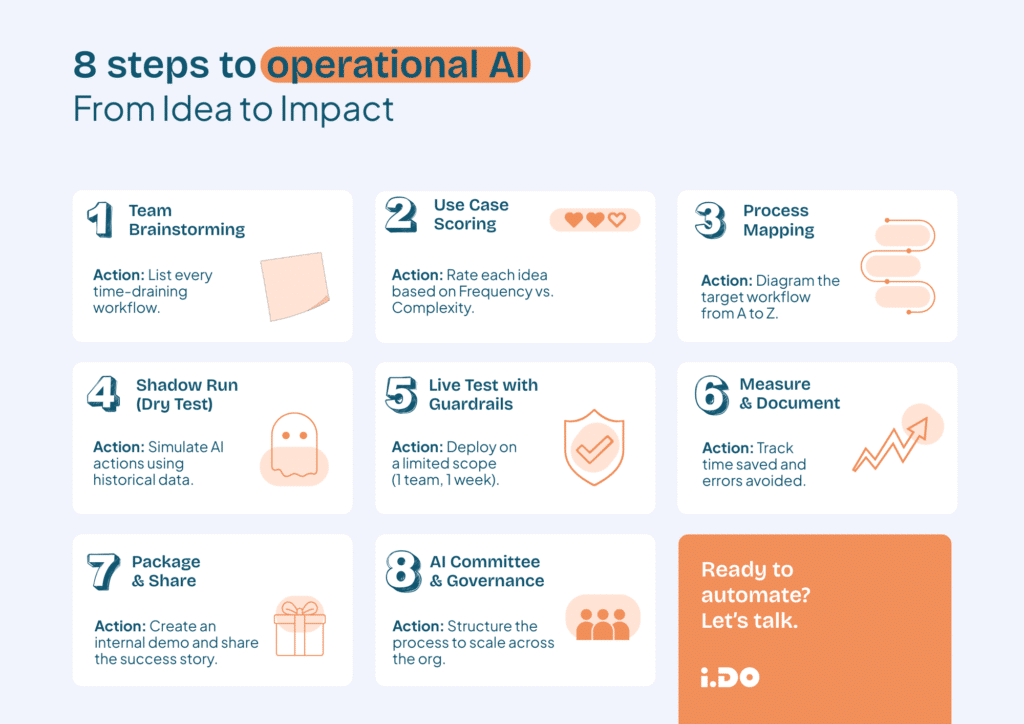
Scaling beyond the first workflow once the first test is successful, standardize what worked:
One successful implementation proves the concept. Sustainable transformation requires a system.
Standardize what worked. Document your AI design process. Create checklists for evaluating new use cases. Build templates that accelerate future implementations.
Identify internal champions. Find the people in each team who are curious about AI and willing to experiment. Equip them with knowledge and support. Let them lead adoption within their areas.
Create feedback loops. Regularly review what’s working and what isn’t. Share learnings across the organization. Iterate on your approach.
This is how you move from isolated experiments to repeatable AI practice that spans your entire organization.
What to do tomorrow
You don’t need a massive initiative to start. You need momentum.
- Gather three people who understand your operations.
- Block one hour on the calendar.
- List every process where humans are doing repetitive tasks they shouldn’t be doing
- Pick the single best candidate
That’s your starting point.
AI won’t transform your company overnight. But it can absolutely transform one workflow this week. And that’s exactly how meaningful change begins.