



In this installment of Arthur’s Agents Playbook series, we look at how Asana AI Teammates can turn recurring project reporting into executive-ready briefs. Teams often have the right data already spread across tasks, comments, dependencies, and status history, but still spend too much time pulling it together manually. With a recurring reporting task assigned to an AI Teammate, that work becomes structured, repeatable, and ready on schedule.
At i.DO, an Asana Solutions Partner, we see this as one of the most practical uses of AI in work management: less reporting overhead, better visibility for stakeholders, and more time for teams to focus on execution.
Why manual executive reporting breaks down
Most executive reporting processes fail for the same reasons:
- Project information lives in too many places. Scope, blockers, ownership, and timelines are spread across tasks, comments, dependencies, and custom fields.
- Updates depend on one person. A project manager or team lead still has to gather the signal, write the summary, and format it for the audience.
- Reporting formats vary by stakeholder. Leadership may want slides, operators may want a task thread, and external stakeholders may prefer a document.
- The process is repeated from scratch each time. Even when the structure stays the same, the work starts over every week or month.
This is why many teams end up with status updates that are late, shallow, or inconsistent.
What Asana AI Teammates do differently
Asana AI Teammates can work across the Asana work graph, which means they do not rely on a single status field or one manually updated summary. They can read the operational context behind the project.
That includes:
- Task descriptions and assignees to understand scope and ownership
- Custom fields to identify status, priority, or workstream signals
- Comments and discussions to catch emerging risks and unresolved blockers
- Status update history to compare current progress with past reporting
- Timelines and dependencies to detect planning drift and sequencing issues
This is what makes AI-generated executive briefs useful. The brief is not based on one snapshot. It is based on the actual flow of project work.
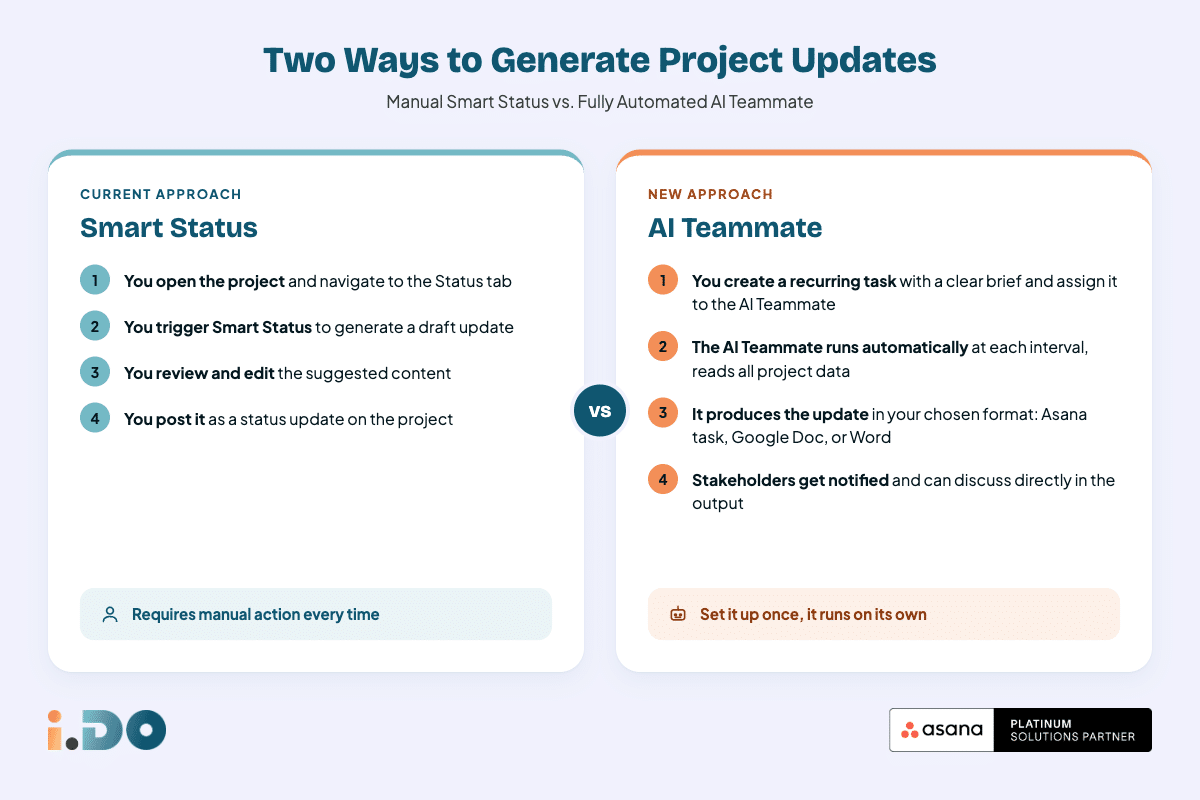
How to automate executive briefs in Asana
The setup is simple and repeatable.
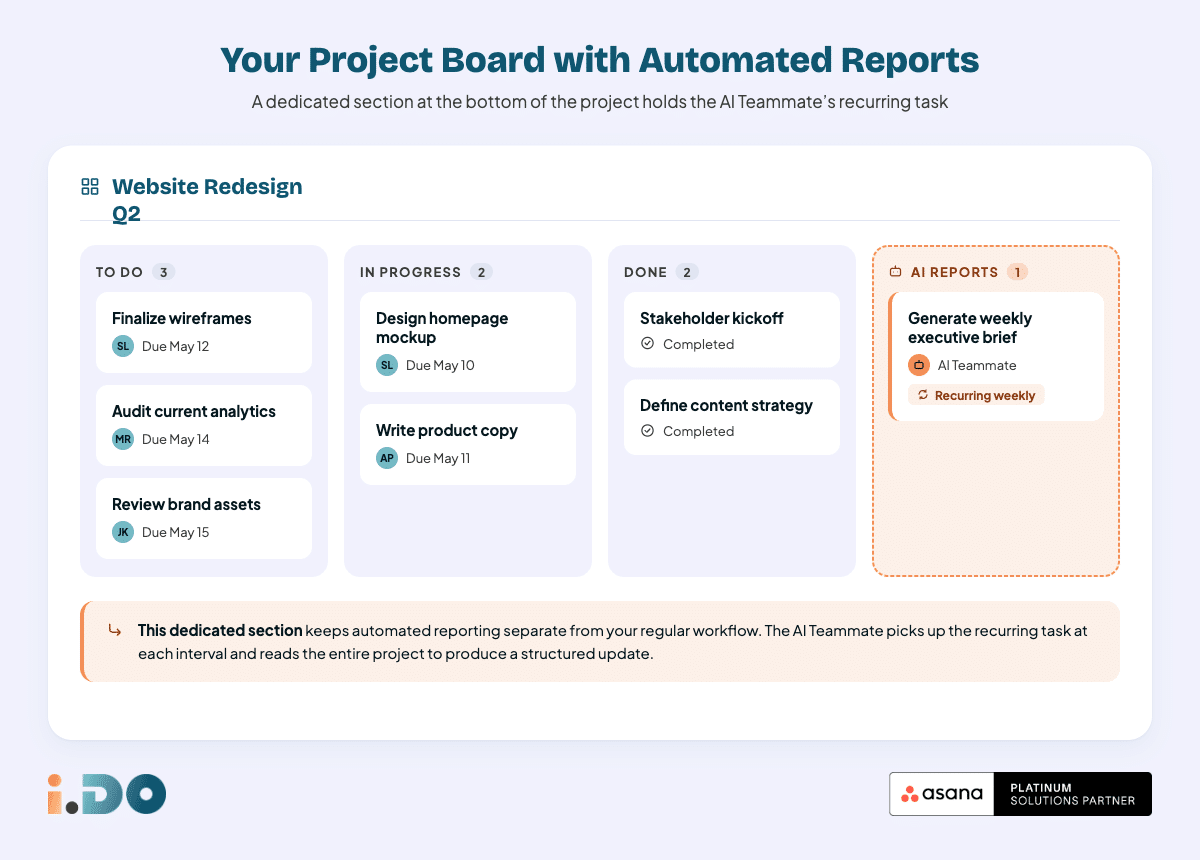
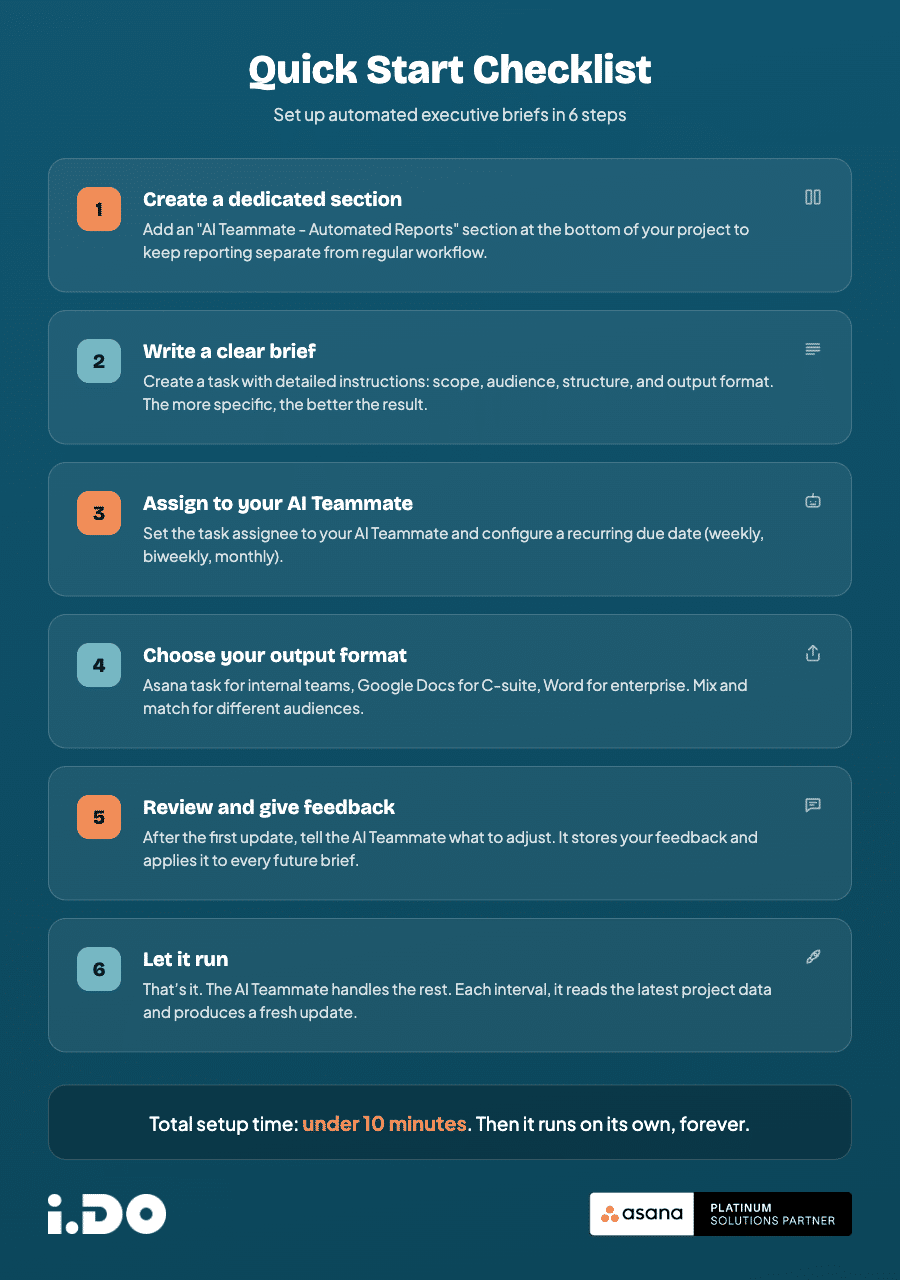
1. Create a dedicated reporting section in your project
Add a section at the bottom of the project for automated reporting tasks. This keeps the reporting workflow visible without mixing it into day-to-day execution work.
A clear section name like AI Teammate – Automated Reports makes the intent obvious to everyone.
2. Create a task with the reporting instructions
Inside that section, create a task assigned to your AI Teammate. In the task description, specify:
- which project or projects to analyze
- who the audience is
- what structure the brief should follow
- what level of detail is expected
- how often the update should be produced
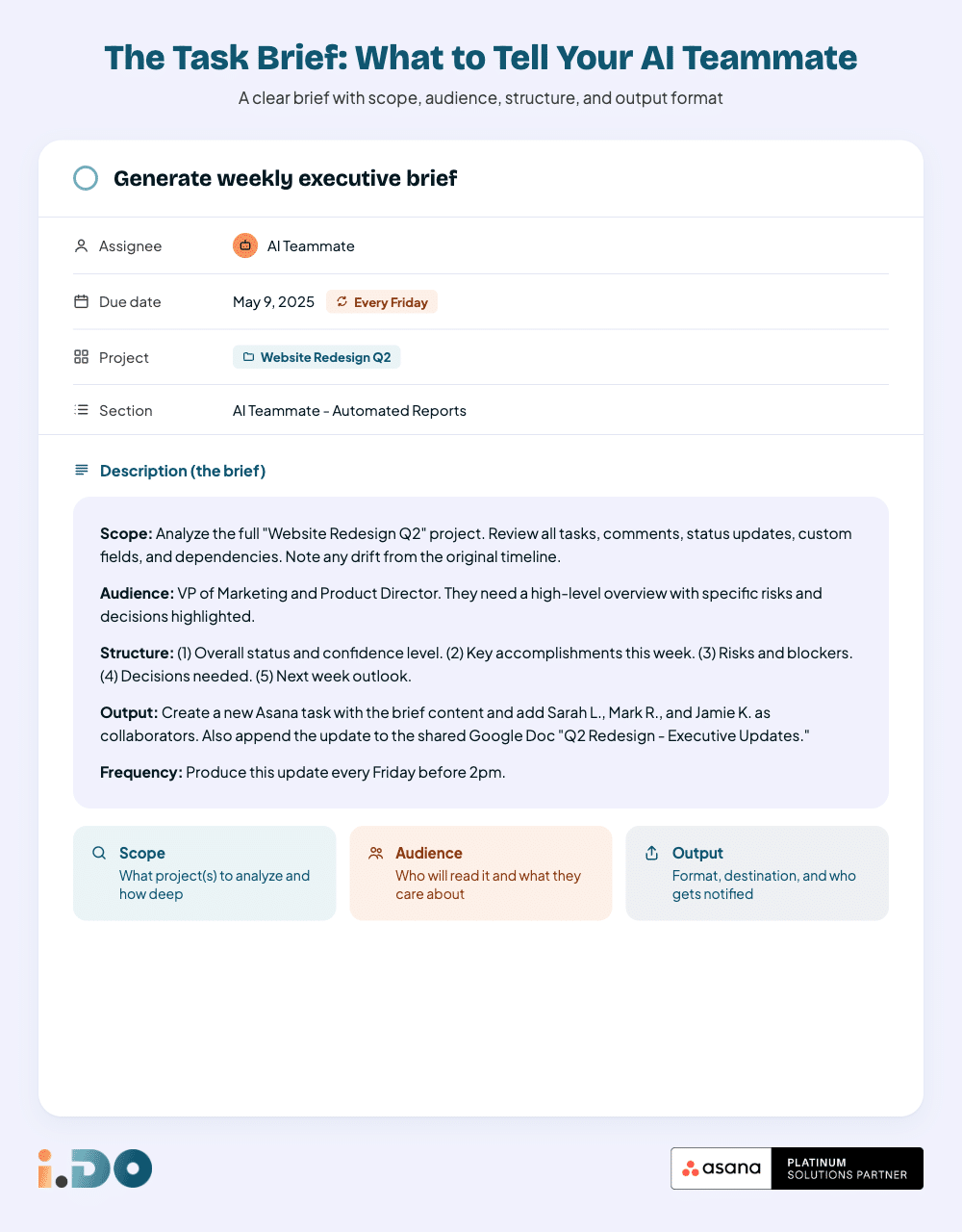
The clearer the reporting brief, the better the output quality.
3. Add a recurring due date
Set the task to recur weekly, biweekly, or monthly depending on the reporting cadence. Once the AI Teammate completes the task, Asana creates the next occurrence automatically.
That means the reporting process keeps running without anyone needing to recreate the task or remember the deadline.
Choose the right output format for your stakeholders
One of the biggest advantages of AI Teammates is that executive briefs do not have to live in a single format.
Asana task
Best for teams already working in Asana.
Each update can be delivered as a task with stakeholders added as collaborators. This keeps every executive brief tied to a discussion thread, which is useful when leadership wants to ask follow-up questions directly in context.
Google Docs
Best for executives or partners who prefer a running document.
AI Teammates can append updates into the same document over time, creating a chronological record of project reporting in one place.
Microsoft Word
Best for organizations running on Microsoft 365.
The same principle applies in OneDrive or SharePoint, where executive updates can be written into .docx files for stakeholders who operate outside Asana.
HTML report
Best for highly visual summaries.
HTML reports are useful when you want a more dashboard-style output with structured sections, visual hierarchy, and a more branded presentation.
PowerPoint slides
Best for steering committees, board reviews, or leadership meetings.
When the output needs to be presentation-ready, AI Teammates can generate slide-based executive briefs that are easier to review live.
Why memory makes the system better over time
The real advantage is not just automation. It is adaptation.
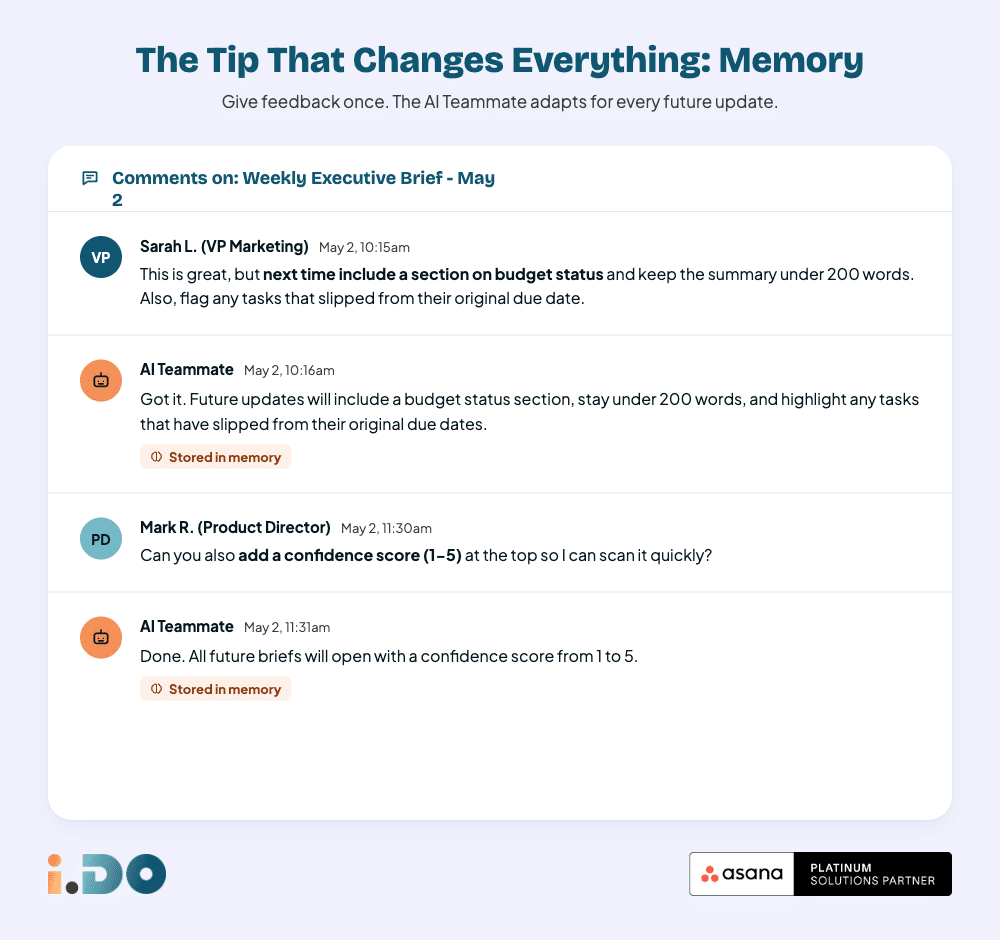
If an executive brief misses an important section, uses the wrong level of detail, or needs a stronger focus on a specific KPI, you can give feedback once and improve future outputs.
For example:
- include a dedicated section on budget status
- keep the summary under 200 words
- surface cross-project dependencies more clearly
- focus more on risks than on completed work
This matters because most reporting systems are rigid. AI Teammates are not. They can adjust to stakeholder preferences over time without forcing teams to redesign the whole process.
What a strong executive brief should include
Automation only helps if the content is useful. A strong executive brief should answer the questions leadership actually has:
- What changed since the last update?
- What is on track, at risk, or blocked?
- What decisions or escalations are needed?
- What should leadership pay attention to now?
That is the difference between a reporting ritual and an executive communication tool.
Best practices for better AI-generated project updates
To get better results from Asana AI Teammates, follow these principles:
Keep project data clean
AI can only synthesize what exists. Strong task hygiene, clear ownership, and updated fields lead to better briefs.
Write for the audience, not for the system
An executive audience does not need every detail. It needs the signal: progress, risk, timing, and required decisions.
Standardize the structure
If every update follows the same structure, stakeholders know where to look and the AI can produce more consistent outputs.
Refine through feedback
Treat the first version as the baseline, not the final form. Small feedback loops improve the quality of future reports quickly.
Bonus: Your Quick Start Checklist
FAQ: Asana AI Teammates for executive reporting
Can Asana AI Teammates create recurring executive briefs automatically?
Yes. A recurring task assigned to an AI Teammate can trigger executive brief creation on a fixed schedule, with each new occurrence generated automatically after completion.
What information can AI Teammates use to write a project brief?
They can use the Asana work graph, including task details, comments, custom fields, dependencies, and status history, to build a more informed summary.
Which format is best for executive project updates?
It depends on the audience. Asana tasks work well for internal teams, documents work well for asynchronous leadership review, and slides work well for meetings.
Do AI Teammates improve over time?
Yes. Feedback on tone, structure, length, or focus can be reused to improve future updates, making the reporting workflow more tailored over time.
Final takeaway
If your team is still building executive briefs manually, the process is costing more than it should. Asana AI Teammates turn reporting into a repeatable operating system: one that reads the real state of work, delivers updates in the right format, and improves with feedback.
For teams that need stakeholder-ready project reporting without adding more admin overhead, this is already one of the clearest AI use cases in Asana.