


Why finance teams need more than a project list
Asana is organized as a connected system. Tasks form the foundation. Projects bring related tasks together. Portfolios organize projects, and work can connect to broader goals and the company mission.
For day-to-day finance operations, the most important layer is the foundation: tasks, projects, automations, and forms. This is where requests are captured, work is assigned, deadlines are managed, discussions happen, and processes move from one step to the next.
That structure matters because finance work is rarely a single isolated action. A request may need an owner, a budget, an approval step, a deadline, supporting information, and follow-up with another department. A financial statement may involve many contributors, dependencies, and dates tied to a final reporting deadline.
Use case 1: Improve purchase request management
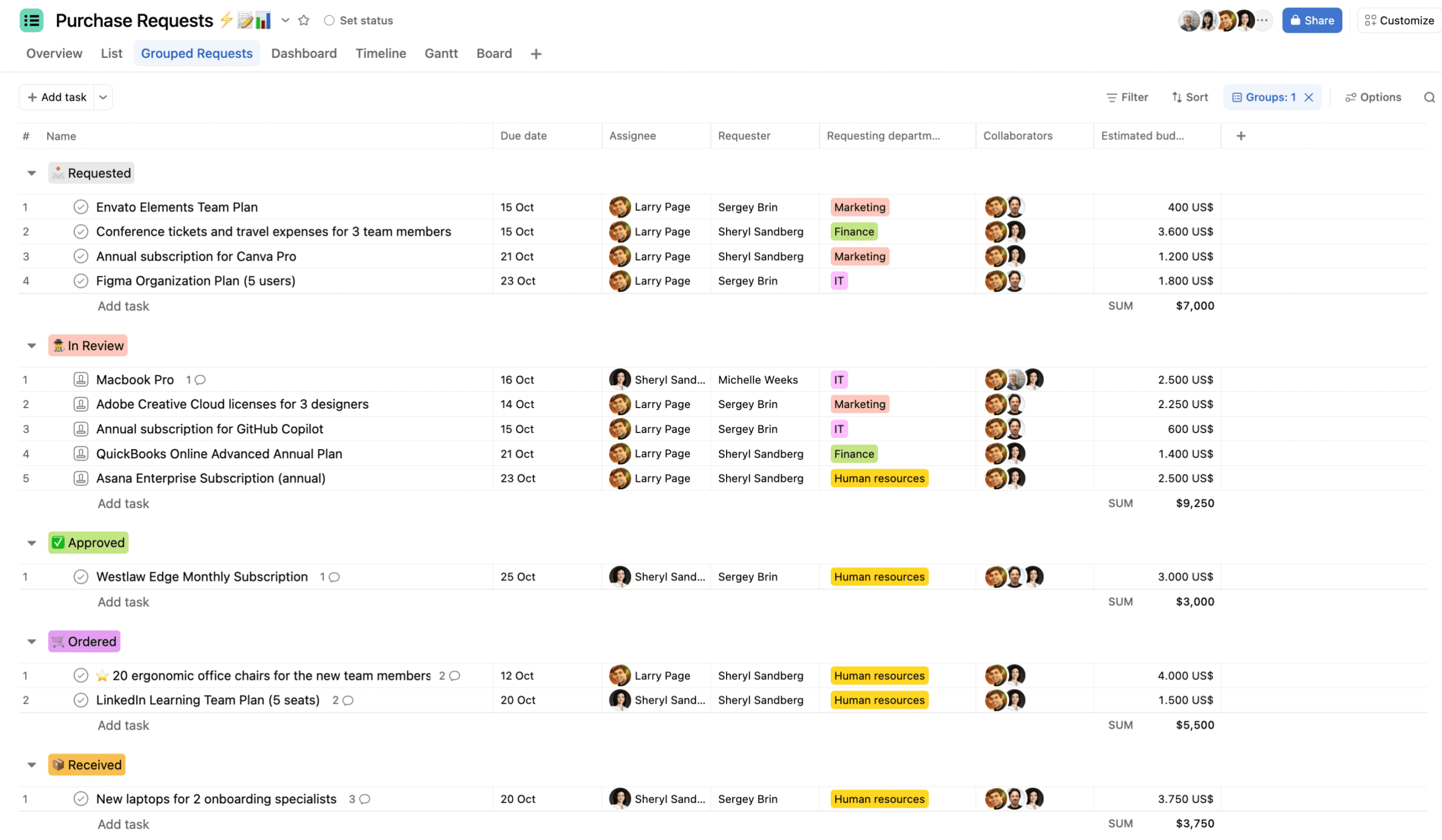
Purchase requests often arrive by email. The result is familiar: back-and-forth conversations, missing information, unclear ownership, and limited visibility into what is waiting, approved, or in progress.
Asana turns that informal exchange into a consistent finance workflow.
1. Capture complete requests with an Asana form
Start with a form that employees can use to request a purchase. The form can collect the information the finance team needs before work begins, such as the request details, department, budget, and other relevant fields.
Instead of asking follow-up questions by email, finance receives a more complete request from the start. The form becomes the entry point for the workflow.
2. Turn each submission into an actionable task
A form submission creates an Asana task. From there, the request becomes a living work item that the team can manage and discuss.
A purchase request task can include:
- An assignee: One person is responsible for moving the request forward.
- A due date: The team can set a clear deadline.
- Custom fields: Information such as request type, department, or budget stays visible and structured.
- Formulas: Calculations can support budget tracking and other operational needs.
- Task discussions: Finance and requesters can exchange information in the context of the specific request.
This keeps the request, its context, and its next steps together instead of scattering them across inboxes.
3. Route requests with automation
Once the workflow is defined, automation can help move requests through it. New requests can be assigned to a consistent owner, or different request types can be routed to the right department or colleague.
Automated steps reduce manual triage and make the process more predictable. Each request follows the same basic logic while still allowing the finance team to adapt the workflow when requirements change.
4. Track finance work with dashboards
Structured requests create structured reporting. Once purchase requests use consistent custom fields, finance teams can build dashboards to monitor the information that matters to them.
A dashboard can provide visibility into:
- The number and type of requests
- Request amounts and budgets
- Work in progress
- Requests waiting for action
- Trends across departments
This gives finance leaders a clearer view of the workload without manually consolidating updates from multiple email threads.
Use case 2: Manage annual financial statements with a repeatable process
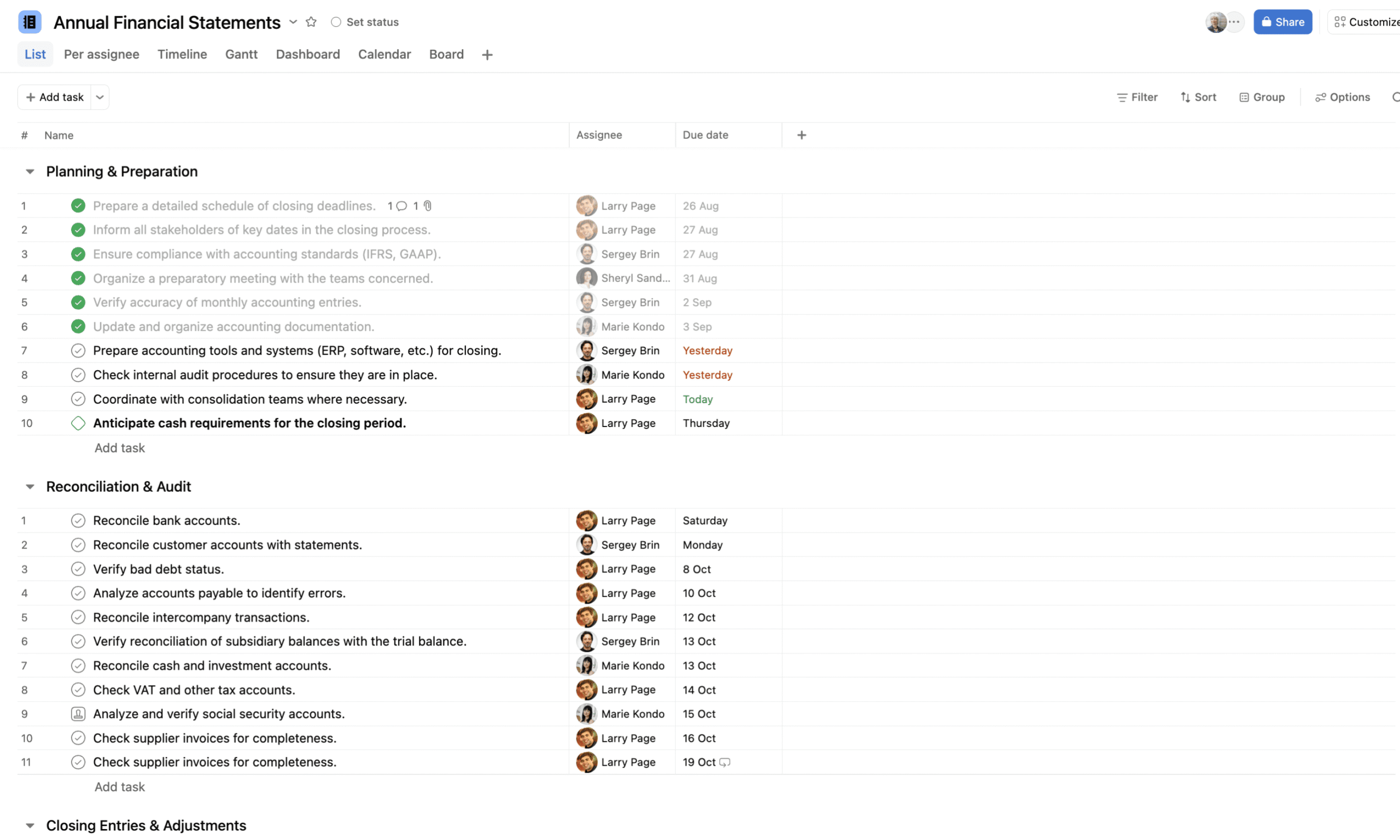
Annual financial statements involve many steps. When the process depends on people remembering what to do, important tasks can be missed and responsibilities can become unclear.
A better approach is to create an annual financial statement project from a template that has been improved over time.
Start with a reliable financial statement template
A template gives the finance team a documented checklist for the full process. Each step is already defined, so the team does not have to rebuild the project from scratch every year.
The template can include the recurring tasks, instructions, owners, and expected sequence of work. Over time, the team can improve the template based on what it learns from each reporting cycle.
Assign owners and dates
Each task can be assigned to the right person and connected to a deadline. Dates can be planned around the final year-end reporting deadline, giving the team a clear path through the work.
This makes ownership visible. Everyone can see which tasks are theirs, what is due next, and where work may be delayed.
Map dependencies and follow the timeline
Some financial statement activities depend on other tasks being completed first. Asana helps teams represent those dependencies and view the project on a timeline.
That makes it easier to understand the sequence of work, identify potential delays, and react when a date or responsibility changes. The team can unload the process from its collective memory and rely on a documented system instead.
Reuse the same approach for recurring finance processes
The same method can support processes that happen weekly, biweekly, monthly, bimonthly, or annually. If a finance process repeats, the team can build a reusable template and improve it over time.
Recurring workflows are especially valuable when they involve multiple contributors, handoffs, or deadlines. A consistent structure helps the team spend less time recreating the process and more time completing the work.
Build visibility across finance operations
Finance teams can use Asana to organize more than purchase requests and annual statements. Structured projects and custom fields can also support financial dashboards for items such as invoices and quotes.
The goal is not to add another place to check. The goal is to create one shared view of work that is currently spread across emails, meetings, and individual to-do lists.
When finance work is organized in this way, teams gain:
- More clarity: Projects, requests, owners, and deadlines are easier to understand.
- Greater agility: Teams can respond to changes without losing track of the process.
- Less internal email: Discussions and updates stay connected to the relevant work.
- Better meetings: Teams can use meetings for decisions and problem-solving instead of basic status updates.
How to get started with finance workflow management in Asana
A practical starting point is one process that is repetitive, manual, and difficult to follow. Use the following steps to structure it:
- Choose a high-friction process. Start with purchase requests, annual statements, or another recurring workflow.
- Map the required information. Identify what requesters need to provide before the work can begin.
- Define ownership and deadlines. Decide who acts at each stage and how dates relate to the final outcome.
- Create the form or template. Use a form for incoming requests and a template for repeatable projects.
- Add routing and automation. Assign work, move tasks through stages, and automate calculations where useful.
- Build a dashboard. Track the workload, budgets, request types, and other fields that support decisions.
- Improve the workflow over time. Treat the process as a living system and refine the template as the team learns.
Frequently asked questions
Is Asana suitable for finance teams?
Yes. Asana is well suited to finance workflows that require clear ownership, deadlines, collaboration, repeatable steps, and visibility across projects. It helps teams organize operational work such as purchase requests, financial statement preparation, invoices, quotes, and other recurring processes.
How can finance teams manage purchase requests in Asana?
Finance teams can create a form that collects the required information. Each submission becomes a task with an assignee, due date, custom fields, budget information, formulas, and discussions. Automations can then route requests and dashboards can show the overall workload.
Can Asana support annual financial statement preparation?
Yes. Finance teams can create a project template containing the full financial statement checklist, task owners, instructions, dates, and dependencies. Each year, they can create a project from the improved template and manage the work through a timeline.
What recurring finance processes can be managed in Asana?
Any recurring process with multiple steps, contributors, or deadlines can be structured in Asana. This includes weekly, biweekly, monthly, bimonthly, and annual processes, as well as workflows for invoices, quotes, and purchase requests.
How can i.DO help a finance team get started?
As an Asana Solutions Partner, i.DO helps finance teams turn existing work into practical workflows. That can include designing a form, building a project template, setting up automation, creating dashboards, or running a custom demonstration with the team.
Make finance work easier to follow
If your finance team is spending too much time chasing information, remembering process steps, or consolidating updates, start by bringing one recurring workflow into Asana. A well-designed form or template can make ownership, deadlines, discussions, and next steps visible from the beginning.
To explore how Asana could support your finance workflows, book a call with i.DO for a custom review and demonstration.